A bank transfer receipt shows proof of a completed transfer between bank accounts. It is commonly used for accounting records, reimbursements, and payment confirmation between individuals or businesses.
Bank Transfer Receipt
Add custom logo
Edit line items
Choose payment method
Add/remove elements
Customize business information
Choose font
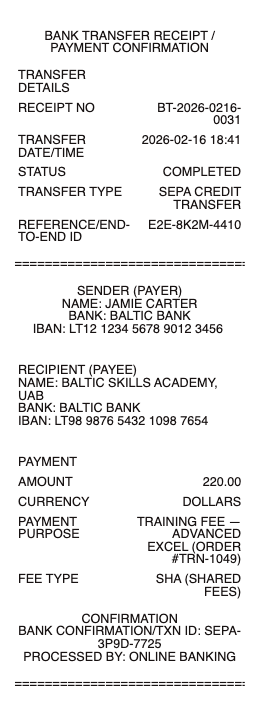
What's on a Bank Transfer Receipt
A bank transfer receipt is the proof that money moved from one account to another — an ACH payment, a domestic or international wire, or an instant transfer. Unlike a store receipt, it is built around account and routing data. A complete bank transfer receipt (or payment confirmation) includes:
Confirmation or reference number — the unique ID for the transfer (trace number, IMAD/OMAD, or SWIFT reference)
Date and time the transfer was initiated and completed
Sender details — name, bank, and account number (usually masked to the last four digits)
Recipient / beneficiary details — name, bank, and account or IBAN
Routing information — routing/ABA number (US), sort code (UK), or BIC/SWIFT (international)
Amount and currency, plus any transfer fee
Transfer type — ACH, wire, SEPA, Faster Payments, Zelle, or another rail
Status (Completed, Processing, Pending) and an optional memo or payment reference
ACH, Wire, and Instant Transfers Produce Different Receipts
The receipt depends on which rail carried the money. An ACH transfer — the standard US bank-to-bank payment — shows a trace number, settles in 1–3 business days, and usually carries little or no fee. A domestic wire is same-day, shows an IMAD/OMAD reference, and typically costs $15–$35. An international wire runs over the SWIFT network and adds a BIC/SWIFT code, IBAN, exchange rate, and correspondent-bank fees. Instant transfers — Zelle, FedNow, RTP, or the UK's Faster Payments — clear in seconds and show a simpler confirmation. When you recreate a transfer receipt, match the fields to the rail you used so the document is internally consistent.
Reference Numbers: How a Transfer Is Traced
Every completed transfer carries a reference that lets either bank locate it. For ACH, that's the 15-digit trace number. For a US Fedwire, it's the IMAD (input) and OMAD (output) reference. For an international wire, the SWIFT MT103 is the formal confirmation document, and each payment now carries a UETR — a unique tracking code you can follow through SWIFT gpi. This reference is the single most important field on a transfer receipt: it is what a landlord, vendor, or auditor uses to confirm the payment actually cleared, so include it and make sure it matches the amount and date.
Domestic vs International (SWIFT / IBAN) Transfers
A domestic transfer needs only the local routing details — a routing/ABA number in the US, a sort code in the UK, or a BSB in Australia — plus the account number. An international transfer adds several fields: the recipient's IBAN, the bank's BIC/SWIFT code, the currency and exchange rate, and often a correspondent (intermediary) bank that takes its own fee. That is why an international transfer receipt often shows a slightly lower amount received than sent. If you're documenting a cross-border payment — paying an overseas supplier, sending money to family, or settling a foreign invoice — include the IBAN, BIC, rate, and both the sent and received amounts so the record is complete.
Related money transfer receipts: see also our wire transfer receipt guide and our ACH payment receipt guide.
Generate a Bank Transfer Receipt — Free, No Login
Our bank transfer receipt generator builds a clean payment confirmation with every field in place: reference or trace number, date and time, sender and beneficiary details, routing/IBAN/SWIFT, amount and currency, transfer type, fee, and status. Choose the transfer type — ACH, wire, international, or instant — edit each field, and download a formatted file in PDF, PNG, or JPG in under a minute, no account required. It's ideal for reconstructing a confirmation you couldn't export cleanly, giving a landlord or vendor clear proof of payment, or keeping a tidy bookkeeping record.
Legal note: Any Receipt Generator is not affiliated with any bank and does not process payments, validate, or certify the authenticity of any generated document. This tool is intended strictly for legitimate record-keeping, reimbursement, and bookkeeping purposes. Creating a receipt for a transfer that did not occur, altering an amount, or using a document to commit fraud is prohibited; users assume full responsibility for the accuracy and intended use of the files they generate.
For a specific bank, see the Bank of America wire transfer receipt and the Chase bank transfer receipt. Paid from a phone wallet instead? Use the Google Pay receipt.
Frequently asked questions
Everything you need to know about the product and billing.
What is a bank transfer receipt?
A bank transfer receipt is proof that money moved between accounts — an ACH payment, a domestic or international wire, or an instant transfer — showing the reference number, date, sender and recipient, amount, and status.
What details are on a bank transfer confirmation?
The confirmation or trace number, date and time, sender and beneficiary names and accounts, routing/IBAN/SWIFT details, the amount and currency, the transfer type, any fee, and the status.
What's the difference between an ACH transfer and a wire?
ACH is the standard bank-to-bank payment — 1–3 business days, low or no fee, shows a trace number. A wire is same-day, shows an IMAD/OMAD reference, and usually costs $15–$35; international wires add SWIFT/BIC and IBAN details.
Can I create a receipt for an international (SWIFT) transfer?
Yes. Choose the international transfer type and fill in the IBAN, BIC/SWIFT code, currency, exchange rate, and both the sent and received amounts so the record matches a cross-border payment.
How do I show proof of a bank transfer to a landlord or vendor?
A clean transfer receipt showing the reference number, date, both parties, and the amount is the standard proof. The reference or trace number is what lets the recipient confirm the payment cleared.
What formats can I download, and is it free?
You can export bank transfer receipts as PDF, PNG, or JPG for free, with no login. Watermark-free downloads are available with a paid upgrade.