A Wise receipt documents a domestic or international transfer processed through Wise. It is commonly used for cross-border payments, freelance payouts, and business transfers.
Wise Receipt
Add custom logo
Edit line items
Choose payment method
Add/remove elements
Customize business information
Choose font
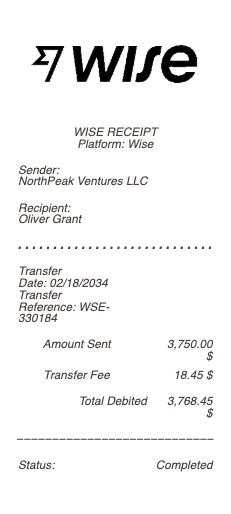
What's on a Wise Transfer Receipt
A Wise transfer receipt (Wise was formerly TransferWise) confirms an international or local money transfer sent through Wise. Because Wise is built around transparent currency conversion, its receipt shows both what you sent and what the recipient received. A complete Wise transfer receipt includes:
Transfer reference number
Date and time the transfer was set up and completed
Sender name and the source account
Recipient name and account/IBAN
Amount sent and amount received, with the currency pair
The exchange rate used (Wise's mid-market rate)
The Wise fee, shown as its own line
Status and, for a SWIFT transfer, an MT103 reference
The Mid-Market Rate and Wise Transfer Fees
The reason people choose Wise is its pricing, and that's exactly what the receipt documents. Wise converts at the mid-market exchange rate — the real rate with no markup — and charges a separate, transparent fee instead of hiding a margin in the rate. So a Wise transfer receipt shows the mid-market rate, the Wise fee as its own line, and both the amount sent and the amount that actually arrived. For anyone documenting an international payment — reconciling an invoice, claiming an expense, or proving what a transfer cost — those three figures are the ones that matter, and keeping them on the receipt makes the record accurate.
Local Transfers vs a Wise Wire (SWIFT / MT103)
Wise doesn't always use the SWIFT network. Where it can, it moves money over local rails in each country, which is faster and cheaper and shows a simple local reference. When a true wire is needed, Wise sends over SWIFT and can provide an MT103 — the formal international wire confirmation — along with the recipient's IBAN and the bank's BIC/SWIFT code. A Wise bank transfer receipt should match the method used: a local transfer shows local account details, while a Wise wire shows the SWIFT/MT103 reference and IBAN so the receiving bank can trace it.
Why People Need a Wise Transfer Receipt
Wise is a default for cross-border money, so its receipts are constant proof-of-payment. Freelancers and remote workers paid from abroad use them to reconcile invoices and report income. Businesses paying overseas suppliers keep them for bookkeeping. Individuals sending money to family, paying tuition, or covering an expat expense use them as a record — and sometimes as proof of funds for a visa or tax filing. Wise lets you download a confirmation, but a clean, formatted receipt showing the reference, both amounts, the rate, and the fee is easier to attach to a specific invoice, claim, or file.
Related money transfer receipts: see also our Revolut receipt guide and our SWIFT transfer receipt guide.
Generate a Wise Transfer Receipt — Free, No Login
Our Wise receipt generator builds a clean transfer confirmation with every field in place: transfer reference, date, sender, recipient name and IBAN/account, amount sent and received, currency pair, mid-market exchange rate, Wise fee, status, and — for a wire — the SWIFT/MT103 reference. Edit each field and download a formatted file in PDF, PNG, or JPG in under a minute — no account required. It's ideal for reconstructing a confirmation you couldn't export cleanly, attaching clear proof of an international payment to an invoice, or keeping an accurate bookkeeping record.
Legal note: Any Receipt Generator is not affiliated with, endorsed by, or associated with Wise (or TransferWise), and does not process payments or validate the authenticity of any generated document. This tool is strictly for legitimate record-keeping, reimbursement, and bookkeeping purposes. Creating a receipt for a transfer that did not occur, altering an amount, or using a document to commit fraud is prohibited; users assume full responsibility for the accuracy and intended use of the files they generate.
Frequently asked questions
Everything you need to know about the product and billing.
What is a Wise transfer receipt?
A Wise transfer receipt (Wise was formerly TransferWise) confirms an international or local money transfer, showing the reference number, date, sender and recipient, the amount sent and received, the exchange rate, and the Wise fee.
What details are on a Wise receipt?
The transfer reference, date, sender, recipient name and account or IBAN, amount sent and amount received, the currency pair, the mid-market exchange rate, the Wise fee, the status, and an MT103 reference for a SWIFT wire.
How are Wise transfer fees shown on the receipt?
Wise converts at the mid-market exchange rate with no markup and charges a separate, transparent fee, so the receipt shows the rate, the fee as its own line, and both the amount sent and the amount received.
Does Wise use SWIFT for wire transfers?
Wise uses local payment rails where possible, which is faster and cheaper. When a wire is needed it sends over SWIFT and can provide an MT103 confirmation with the recipient's IBAN and the bank's BIC/SWIFT code.
Why would I need a Wise transfer receipt?
As proof of an international payment — to reconcile an invoice, report freelance income, keep business bookkeeping, or provide a record for a family transfer, tuition, tax, or visa filing.
What formats can I download, and is it free?
You can export Wise receipts as PDF, PNG, or JPG for free, with no login. Watermark-free downloads are available with a paid upgrade.