Amazon Receipt

Add custom logo
Edit line items
Choose payment method
Add/remove elements
Customize business information
Choose font

Overview of an Amazon Receipt

An Amazon receipt shows the details of an online purchase made through Amazon. It is commonly used for returns, reimbursements, warranty claims, and expense tracking.

Unlike in-store receipts, Amazon receipts are tied to an order rather than a single transaction at a location. Orders can include multiple items, often shipped separately or sold by different sellers.

What an Amazon Receipt Includes

A typical Amazon-style receipt includes:

  • order number

  • purchase date

  • itemized list of products

  • item prices and quantities

  • applied discounts (if any)

  • subtotal

  • sales tax

  • total amount paid

  • shipping details

  • billing information

  • payment method

Each item is clearly listed with its price, quantity, and any applied discounts.

Key Characteristics of Amazon Receipts

What makes this format distinct is its order-based structure. Instead of representing a single checkout moment in a physical store, the receipt reflects an entire order that may include multiple shipments or sellers.

Because Amazon purchases are linked to order IDs, the order number is one of the most important elements. It is used to identify transactions, track shipments, and process returns.

Many users also look for Amazon receipts when they actually need an invoice. While similar, invoices may include additional billing details such as company information or VAT where applicable.

Common Uses of Amazon Receipts

Amazon receipts are frequently used for:

  • tracking online purchases and deliveries

  • submitting reimbursements or business expenses

  • warranty claims and product verification

  • managing returns and refunds

Structure and Format

The format is designed for digital use and is typically accessed through an account dashboard, email confirmation, or downloadable PDF. It prioritizes clarity, structured itemization, and easy navigation across order details.

Important Notice (Legal Use)

This example is provided for educational, formatting, and record-keeping purposes only. It is not intended for any illegal, deceptive, or misleading use.

When This Format Is Useful

An Amazon-style receipt format is useful when you need a structured layout for online purchases, including order-based details, shipping information, and clear itemization.
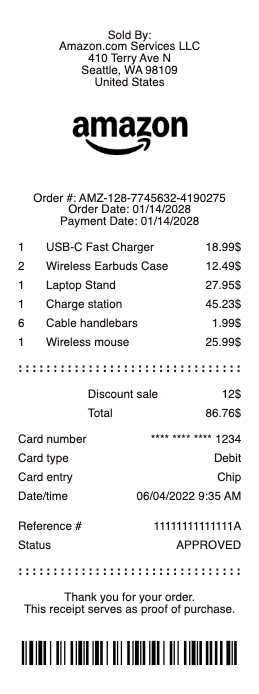
Amazon Receipt

What's on an Amazon Receipt

An Amazon receipt — Amazon calls it the order summary or invoice — records everything about a purchase. A complete Amazon receipt shows:

  • Order number — Amazon's 17-digit format, such as 114-3941689-2049835, used to look up or return the order.

  • Order and ship dates — when the order was placed and dispatched.

  • Sold by and ships from — Amazon.com or the third-party seller, which matters for returns and warranty.

  • Items, quantities, and unit prices — each product with its price.

  • Ship-to address and delivery speed — recipient and shipping option.

  • Order totals — item subtotal, shipping, tax, any gift-card or promo balance, and the grand total.

  • Payment method — the card ending in its last four digits, or the gift-card balance used.

Amazon usually emails an order confirmation, not a formal receipt — the itemized invoice lives in Your Orders, and that is what you download for expenses or returns.

How to Get and Print an Amazon Receipt

To get a receipt from Amazon on the website, open Your Orders, find the order, and choose Invoice or View order details, then select Printable Order Summary to print it or save it as a PDF. In the Amazon mobile app, tap the order and choose Get invoice or Download invoice. Business buyers on Amazon Business can download a tax invoice with the seller's tax details for expense reports. If you only received the confirmation email, that is not the full receipt — the printable order summary in Your Orders is the document accounting and warranty claims expect. Save it as a PDF so the order number, items, and total stay together for reimbursement.

Amazon Gift Receipts and Returning a Gift

A gift receipt proves an item was bought without showing the price, so the recipient can return or exchange it. Add one at checkout by ticking This is a gift, or afterward from the order's gift options. To return an Amazon gift, the recipient uses Return a gift with the order number or the gift receipt's code; the refund is issued to an Amazon gift-card balance rather than the buyer's card, so the purchase stays private. If you were given something with no receipt at all, ask the gift-giver for the order number — it is the fastest way to start a no-receipt gift return. Keeping the gift receipt with the item avoids the problem entirely.

Amazon Receipts for Expenses, Returns, and Warranty

Beyond the box, an Amazon receipt is your proof of purchase. For expense reports and taxes, the printable order summary shows the seller, date, itemized amounts, and total a finance team needs. For a return, the order number lets Amazon look the purchase up even if you deleted the email. For a warranty or a defective item, the receipt confirms the purchase date and whether the item shipped from Amazon or a third-party seller — the party you will claim against. Amazon keeps your order history for years, so you can reprint an older receipt any time from Your Orders, which helps when a manufacturer asks for dated proof of purchase.

Related online marketplace receipts: see also our eBay receipt guide and our Etsy receipt guide.

Generate an Amazon-Style Receipt

Use the generator above to lay out an Amazon-style receipt with the order number, items, ship-to address, payment method, and totals in a clean, familiar format — useful for reconstructing a receipt you can no longer download, keeping a tidy expense record, or previewing how the details fit together.

Any Receipt Generator is a document tool, and Amazon is a trademark of its owner with no affiliation here. Create receipts only for genuine orders you actually placed, and never to fake a purchase, mislead a seller, or support a false return or refund claim.

Frequently asked questions

Everything you need to know about the product and billing.

How do I get a receipt from Amazon?
Open Your Orders, select the order, and choose Invoice or View order details, then Printable Order Summary to print or save as a PDF. In the app, tap the order and choose Get invoice. The confirmation email alone is not the full receipt.
How do I print an Amazon receipt?
From Your Orders on the website, open the order's Printable Order Summary and use your browser's print or save-as-PDF option. On mobile, download the invoice from the order details first, then print it.
What is an Amazon gift receipt?
A gift receipt confirms an item was purchased without showing the price, so the recipient can return or exchange it. Add one by marking the item as a gift at checkout or from the order's gift options.
How do I return an Amazon gift without a receipt?
Use Amazon's Return a gift option with the order number or gift receipt code; the refund goes to a gift-card balance. If you have neither, ask the gift-giver for the order number to start the return.
Can I look up an old Amazon receipt?
Yes. Amazon keeps your order history for years, so you can reopen any past order in Your Orders and reprint its invoice or order summary whenever you need dated proof of purchase.
What details are on an Amazon receipt?
The 17-digit order number, order and ship dates, the sold-by seller, items with prices, the ship-to address, the subtotal, shipping, tax and total, and the payment method used.