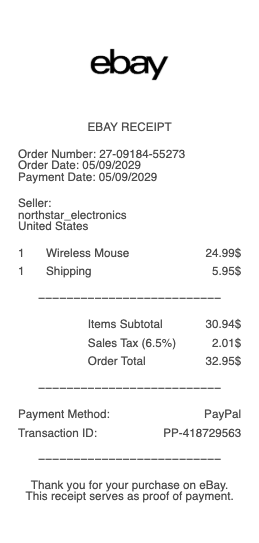
An eBay receipt shows the details of a purchase made on eBay. It is commonly used for reimbursements, expense tracking, resale verification, and personal records. An eBay receipt typically includes the order number, seller information, item details, shipping cost, tax, and total paid. This eBay receipt example follows a realistic marketplace format. It separates item price and shipping, includes seller details, and shows a clear order total. The structure works well for records or recreating a missing receipt. Use an eBay receipt example when you need proof of purchase for a specific marketplace transaction.
eBay Receipt
Add custom logo
Edit line items
Choose payment method
Add/remove elements
Customize business information
Choose font
What's on an eBay Receipt
eBay is a marketplace rather than a single shop, so your "receipt" is the order confirmation and the order-details page in your Purchase history, not a till slip. Whether you need it for proof of purchase, a return or an expense claim, an eBay receipt carries:
Order number — the identifier that ties the purchase to the seller and to eBay support.
Order date and status — when you bought it and where it is (paid, shipped, delivered).
Item details — the listing title, item number, quantity and the price you paid, plus the seller's name.
Shipping — the delivery address, postage cost and tracking, if provided.
Payment summary — subtotal, shipping, any sales tax eBay collected, and the grand total, with the payment method.
How to get and print a receipt from eBay
Here's how to get a receipt from eBay: sign in, open Purchase history from your account, find the order, and choose View order details — that page is your itemised receipt. To print an eBay receipt, use your browser's print option from the order-details page, or save it as a PDF; on the eBay app, open the order and use the share or print action. A confirmation email is sent for every purchase too, so searching your inbox for the item title or order number is the fastest route when you can't get to your account. Guest checkout works the same way — the confirmation email is your record.
Proof of purchase, returns and gift-card receipts
An eBay receipt is your proof of purchase for a warranty claim, a return through eBay's Money Back Guarantee, or an expense report. For a return, the order-details page shows the seller's return policy and the buttons to start the process, and keeping the receipt until the refund posts protects you. Buyers of an eBay gift card often need the receipt as well — whether it's a small denomination or a $200 eBay gift card, the purchase confirmation is what verifies it if there's ever a problem with activation or balance. In every case the order number is the key detail, so note it before you archive the email.
eBay receipts for expenses and records
If you buy on eBay for work or resale, a clean eBay purchase receipt keeps your bookkeeping straight. Because eBay's order-details page acts as the receipt rather than a formal tax invoice, many buyers screenshot or print it to attach to an expense report, and sellers sourcing inventory keep the same records for cost-of-goods. When an old order has scrolled out of easy reach, or a confirmation email was deleted, reconstructing a tidy itemised copy from the order number, item title, price and date you already have keeps the record complete — an accurate stand-in for a purchase that genuinely happened, not a fabricated one.
Related online marketplace receipts: see also our Amazon receipt guide and our Etsy receipt guide.
Create an eBay-style receipt with our generator
Need a clean copy of an eBay receipt for an expense report, a return record or a template mock-up? Our eBay receipt generator recreates the order-confirmation layout — order number, seller, item title and number, price, shipping, tax and total — and exports a print-ready PDF, PNG or JPG in under a minute, no account required. Enter your own order details for a legible copy when the email is buried or the order has aged out of your history. Please use it lawfully and honestly: create receipts only for purchases that actually happened, for your own records and reimbursements — never to fake an order, claim a refund you're not owed, or impersonate eBay or a seller. "eBay" is a trademark of its owner, referenced here only to describe the receipt format.
Frequently asked questions
Everything you need to know about the product and billing.
How do I get a receipt from eBay?
Sign in, open Purchase history, find the order and choose "View order details" — that page is your itemised receipt. A confirmation email is also sent for every purchase, so searching your inbox for the order number or item title is the quickest alternative.
How do I print a receipt from eBay?
From the order-details page, use your browser's print option or save it as a PDF. In the eBay app, open the order and use the share or print action. You can print the confirmation email instead if that's easier to reach.
Where do I find my eBay order number?
It's at the top of the purchase confirmation email and on the order-details page in your Purchase history. It's the key detail for returns, proof of purchase and support, so note it before archiving the email.
Does an eBay receipt work as proof of purchase?
Yes. The order-details page or confirmation email serves as proof of purchase for warranties, returns under eBay's Money Back Guarantee, and expense claims. Keep it until any return or refund is complete.
Can I get a receipt for an eBay gift card?
Yes — the purchase confirmation for an eBay gift card is your receipt, whether it's a small amount or a $200 card. Keep it in case you need to verify activation or the balance later.
Can I use this generator to recreate an eBay receipt?
Yes, for legitimate purposes — replacing a lost order confirmation for your own records, expense reports or design mock-ups. It is not for faking orders, claiming refunds you're not owed, or impersonating eBay or a seller.