A Binance receipt documents a trade or transfer performed on Binance. It is commonly used for exchange records, audits, and tax calculations.
Binance Receipt
Add custom logo
Edit line items
Choose payment method
Add/remove elements
Customize business information
Choose font
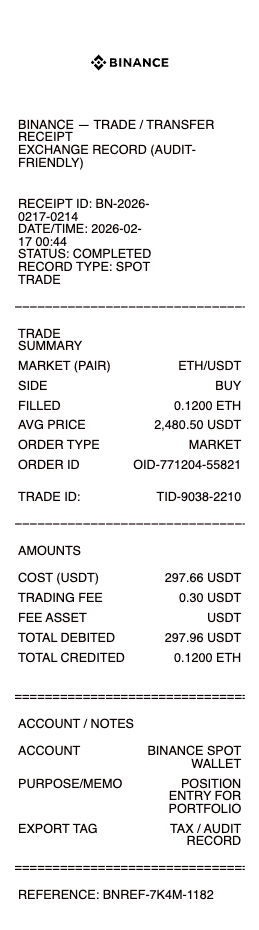
What's on a Binance Receipt
A Binance receipt is the record of a single transaction on the exchange — a spot trade, a crypto deposit or withdrawal, a P2P purchase, or a Convert order. Because it documents on-chain and order data rather than a store purchase, a complete Binance transaction record includes:
Order ID or Transaction ID (TxID) — the unique reference for the trade or transfer
Date and time in UTC, the timezone Binance stamps on every transaction
Trading pair (e.g. BTC/USDT, ETH/FDUSD) or the coin and network for a transfer
Order type — market, limit, stop-limit, or OCO
Filled price, quantity, and total in both the base and quote asset
Trading fee, and whether it was paid in BNB for the discount
Account email or UID and order status (Filled, Completed, Pending)
Network and wallet address (BEP-20, ERC-20, TRC-20, or native chain) for deposits and withdrawals
Spot Trades, P2P, Deposits and Withdrawals Look Different
Binance does not produce one single receipt format — the details depend on what you did. A spot trade shows the trading pair, fill price, quantity, and the maker or taker fee. A P2P purchase records the fiat amount, the payment method, the counterparty's order number, and the crypto received. A deposit or withdrawal centers on the Transaction ID (TxID), the network used, the wallet address, the network fee, and the number of blockchain confirmations — and that TxID can be pasted into a blockchain explorer such as Etherscan, BscScan, or Tronscan to confirm the amount and addresses. A Convert order simply shows "you paid X, you received Y" at a locked quote. When you recreate a receipt, match the layout to the transaction type so the record carries the fields an accountant or auditor expects.
Binance Fees, BNB Discounts and VIP Tiers
The fee line is one of the details people most often need to document. Binance spot trading starts at a standard 0.1% maker and taker fee, but paying fees with BNB cuts that by 25%, so a receipt may show a noticeably smaller fee than 0.1% alone would suggest. High-volume traders move through VIP tiers (VIP 1–9) that progressively lower both maker and taker rates. Withdrawals carry a separate network fee that varies by coin and chain — a few cents over TRC-20, several dollars over ERC-20 when the network is busy. For tax and bookkeeping the fee matters: trading fees are usually added to your cost basis, while withdrawal fees reduce the amount actually received. A clear fee line keeps those calculations correct.
Binance Receipts for Crypto Taxes and Accounting
In most countries crypto is taxable, and every disposal — selling, converting, or spending — can trigger a capital gain or loss. To report it you need the date, the cost basis, the proceeds, and the fees for each transaction. Binance offers a transaction-history CSV export and the Binance Tax tool, but those are aggregated and awkward to drop into an expense report, a reimbursement claim, or a bookkeeping file. A clean, per-transaction receipt is far easier to attach to a single record — proof of when you bought, at what price, and what you paid in fees. Freelancers paid in crypto, businesses holding treasury on Binance, and anyone reconciling a wallet use formatted receipts to keep an audit trail a third party can read at a glance.
Related crypto exchange receipts: see also our Coinbase receipt guide and our Kraken receipt guide. For a simple record of any other payment, see our receipt of payment guide.
Generate a Binance Receipt — Free, No Login
Our Binance receipt generator builds a clean transaction record with every field in place: Order or Transaction ID, date and time in UTC, trading pair or coin and network, order type, filled price, quantity, total, trading fee, BNB discount, wallet address, and status. Choose the transaction type, edit each field, and download a formatted file in PDF, PNG, or JPG in under a minute — no account required. It is ideal for restoring a record you cannot easily re-export, formatting a transaction for an expense or reimbursement claim, or keeping a tidy bookkeeping trail.
Legal note: Any Receipt Generator is not affiliated with Binance and does not validate, certify, or verify the authenticity of any generated document. This tool is intended strictly for legitimate administrative, record-keeping, and bookkeeping purposes. Creating fraudulent documentation or using it for any unlawful activity is prohibited; users assume full responsibility for the accuracy and intended use of the files they generate.
Frequently asked questions
Everything you need to know about the product and billing.
What is a Binance receipt?
A Binance receipt is a formatted record of a single transaction on Binance — a spot trade, deposit, withdrawal, P2P purchase, or Convert order — showing the transaction ID, date, amounts, fees, and status.
Does Binance give you an official receipt?
Binance provides a transaction history and CSV export rather than a clean, per-transaction receipt. Many people reformat that data into a clear receipt that is easier to file, attach to an expense claim, or hand to an accountant.
What details belong on a Binance transaction receipt?
The Order or Transaction ID, the date and time in UTC, the trading pair or coin and network, the order type, the filled price, the quantity and total, the trading fee, and the wallet address for transfers.
Can I create a receipt for a Binance deposit or withdrawal?
Yes. Choose the transfer type and fill in the TxID, the network (BEP-20, ERC-20, TRC-20, or native chain), the wallet address, the amount, and the network fee so the record matches an on-chain transfer.
Do I need Binance receipts for taxes?
Crypto disposals are taxable in most countries, and clear per-transaction records showing the date, cost basis, proceeds, and fees make reporting and audits far simpler than working from an aggregated export.
What formats can I download, and is it free?
You can export Binance receipts as PDF, PNG, or JPG for free, with no login. Watermark-free downloads are available with a paid upgrade.