A Kraken receipt records a transaction on one of the oldest US crypto exchanges — a trade, a fiat deposit, or a withdrawal. Kraken splits into a simple Instant Buy and the lower-fee Kraken Pro, and which you used changes what the receipt costs. Because crypto is taxed, the transaction history behind these receipts is also your tax record. This page explains what a Kraken transaction shows and how to pull the records that matter.
Kraken Receipt
Add custom logo
Edit line items
Choose payment method
Add/remove elements
Customize business information
Choose font
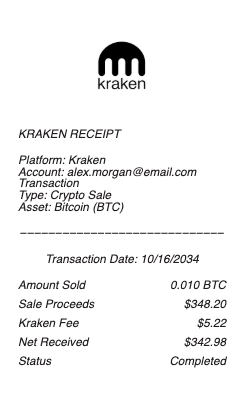
What’s on a Kraken Receipt
Transaction type — buy, sell, deposit, or withdrawal
The asset and amount, and the price/rate
The fee — a maker/taker fee on Pro or a higher Instant Buy fee
Fiat funding method — ACH, wire, or SEPA, for deposits
Date, time, and a reference/txid
For withdrawals, the destination address and network fee
USD (or EUR) value at the time
Instant Buy vs Kraken Pro — Reading the Fee
The biggest driver of what a Kraken transaction costs is which interface you used. Instant Buy is the simple one-click purchase, and it carries a higher fee (and spread) for the convenience. Kraken Pro is the advanced trading platform with a maker/taker fee schedule that’s volume-tiered — the more you trade over a rolling period, the lower your rate, and a maker order (adding liquidity) often costs less than a taker order (removing it). So two identical-size buys can carry very different fees depending on the interface and your volume tier, and the receipt’s fee line reflects it. If you trade regularly, using Pro rather than Instant Buy is the difference the fee line reveals. Reading whether a transaction was Instant Buy or a Pro maker/taker order tells you why the fee is what it is — and where you could reduce it.
Funding, Withdrawals, and Proof of Reserves
Kraken supports fiat funding — bank ACH, wire, and SEPA for euro accounts — and each method has its own fee and timing that show on a deposit or withdrawal record; wires clear fast but cost more, ACH is cheaper but slower. Crypto withdrawals add a destination address and a network fee, and the coins are then verifiable on-chain by their transaction hash. One thing that distinguishes Kraken is its published Proof of Reserves — a cryptographic attestation that it holds the assets customers are owed, which you can verify against your account balance. That’s an exchange-integrity feature, not something on a per-transaction receipt, but it’s part of why account records matter: your Kraken statement is your claim on assets the exchange custodies. Reading the funding method and any withdrawal details keeps your fiat and crypto movements clearly documented.
Statements, Taxes, and Getting Your Records
Everything you do on Kraken lives in your account, and for taxes that history is essential. Crypto is property in the US, so every sale or conversion is a taxable event with a gain or loss, and Kraken provides a downloadable ledger and transaction history (exportable as CSV) plus any applicable tax forms for the year. That export — with each trade’s asset, amount, USD value, and fee — is the practical document for a return, and crypto tax software imports it directly. A single transaction’s receipt is the granular proof behind each line. Keep the annual history the way you’d keep a brokerage 1099: it’s the authoritative record of your cost basis and proceeds. When you need to substantiate a specific trade, deposit, or withdrawal, the Kraken export tied to its reference or txid is what does it.
Related crypto guides: compare the fee and spread model on our Coinbase receipt guide, and for taxing on-chain lending and liquidity income see the DeFi yield receipt guide.
Create a Kraken-Style Receipt
Our generator rebuilds an exchange-transaction receipt in the Kraken style — transaction type, asset and USD value, maker/taker or Instant Buy fee, funding method, and any withdrawal detail — as a clean PDF when you want a legible copy for records or a tax file.
Use it responsibly: recreate only transactions that actually occurred, with their real amounts. Fabricating exchange receipts to misstate crypto gains or losses on a tax return, or to invent proof of funds, is fraud — Kraken’s own ledger and any tax forms it files are the authoritative records tax authorities receive. Kraken is a trademark of its owner; this tool is not affiliated with it and is for legitimate record-keeping only.
If part of your history is on Binance, use the Binance receipt for those transactions so each exchange's records stay separate.
Frequently asked questions
Everything you need to know about the product and billing.
What does a Kraken receipt show?
The transaction type (buy, sell, deposit, withdrawal), the asset and amount, the price and fee (maker/taker on Pro or a higher Instant Buy fee), the fiat funding method for deposits, the date and a reference or txid, any withdrawal address and network fee, and the USD or EUR value.
What’s the difference between Kraken Instant Buy and Kraken Pro?
Instant Buy is a simple one-click purchase with a higher fee and spread for convenience. Kraken Pro is the advanced platform with a volume-tiered maker/taker fee schedule — lower rates for more trading, and maker orders often cheaper than taker. The receipt’s fee reflects which you used.
What are maker and taker fees on Kraken?
On Kraken Pro, a maker order adds liquidity to the order book and usually costs less; a taker order removes liquidity and costs more. Both are volume-tiered, so your rate drops as your rolling trading volume rises — which is why identical trades can carry different fees.
How do I fund my Kraken account?
Kraken supports bank ACH, wire, and SEPA (for euro accounts), each with its own fee and timing shown on the deposit record — wires clear quickly but cost more, ACH is cheaper but slower. The funding method appears on the transaction so you can reconcile it.
What is Kraken Proof of Reserves?
A cryptographic attestation Kraken publishes showing it holds the assets customers are owed, which you can verify against your balance. It’s an exchange-integrity feature rather than a per-transaction line, but it’s why your account statement — your claim on custodied assets — matters.
How do I get my Kraken records for taxes?
Download the ledger and transaction history (as CSV) and any tax forms for the year from your account. With each trade’s asset, amount, USD value, and fee, it’s the practical document for a return and imports directly into crypto tax software; per-transaction receipts are the granular backup.