A Cash App Business receipt records a payment into a Cash App for Business account — the account type merchants, freelancers, and sellers use to take payments, and the one Cash App charges a fee on and reports to the IRS. This page covers the business account itself: how it differs from a personal one, the fee that lands on every payment, and the 1099-K that makes clean records non-optional.
Cash App Business Receipt
Add custom logo
Edit line items
Choose payment method
Add/remove elements
Customize business information
Choose font
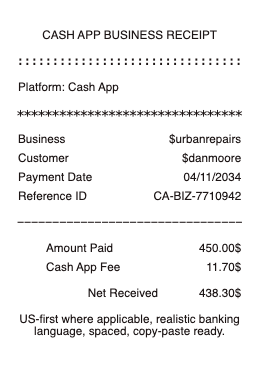
What’s on a Cash App Business Receipt
The business $cashtag — the public identifier customers pay
Payer’s name or $cashtag and the date and time
Gross amount the customer sent
The 2.75% business fee Cash App deducts from each payment received
Net amount deposited to the business balance after the fee
Payment note — the invoice number or item the customer typed
Transaction identifier used for support and reconciliation
Cash App Business Account vs. Personal Account
The two account types behave differently, and the difference is the whole reason this receipt exists. A personal account is built for splitting bills and paying friends; payments are free, but it is not meant for running a business and has lower sending and receiving limits until identity is verified. A business account is built to accept customer payments: it takes a 2.75% fee on every payment received, its profile is public-facing so customers can find and pay the $cashtag, and it carries the tax reporting a business needs. Switching a profile to business is free and takes seconds in Cash App settings — the fee is the trade for being allowed to operate commercially and for the receipt trail that comes with it.
The 2.75% Fee and 1099-K Tax Reporting
Two numbers define a Cash App business account. The first is the 2.75% transaction fee: send a customer an invoice for $100 and $97.25 reaches your balance, which is exactly why sellers keep receipts — the fee is a deductible cost of doing business, but only if it is documented. The second is the 1099-K: Cash App reports business-account payment volume to the IRS on Form 1099-K once it meets the federal threshold for the year, and that form must reconcile against your own records. A shoebox of gross deposits will not survive that reconciliation; a clean receipt per payment — gross, fee, net, note — will. This is the practical reason a business account and disciplined receipts go together.
Receiving Money on a Business Account
Customers pay a business the same way they pay a person — to the $cashtag, in the app or from a payment link — but the money lands net of the 2.75% fee, and both sides can see the record. Buyers routinely ask a small merchant for a receipt for a Cash App purchase, and the business account is what makes issuing one straightforward: the transaction already carries the payer, amount, date, and note. For anything a customer will submit for their own reimbursement or warranty, an itemized receipt referencing the Cash App transaction is far stronger than a screenshot of the activity feed — which is where a generated PDF copy earns its place.
Related digital wallet receipts: see also our Cash App receipt guide and our Zelle receipt guide.
Create a Cash App Business-Style Receipt
Our generator builds a business-payment receipt — business $cashtag and details, payer, gross amount, the 2.75% fee line, net deposited, and the payment note — as a clean PDF for your books and for customers who ask.
Use it responsibly: document real payments actually received, with their true amounts and fees. Fabricating business receipts to misstate income, support a false reimbursement, or mislead on a tax return is fraud. Cash App’s own transaction history and 1099-K are the authoritative record; recreate receipts only to make genuine transactions legible for your files.
Frequently asked questions
Everything you need to know about the product and billing.
What is a Cash App Business account?
The account type for accepting customer payments. Unlike a personal account, it charges a 2.75% fee on payments received, is publicly findable by its $cashtag, and its payment volume is reported to the IRS on a 1099-K.
What is the Cash App business fee?
2.75% of each payment received, deducted automatically — a $100 payment deposits $97.25. It is a deductible business cost, which is one reason keeping the receipt for every payment matters.
What is the difference between a Cash App business and personal account?
Personal accounts are for paying friends and are free but not for business use. Business accounts accept customer payments, take the 2.75% fee, are public-facing, and carry 1099-K tax reporting.
Does Cash App send a 1099-K for business accounts?
Yes — Cash App reports business-account payment volume to the IRS on Form 1099-K once it meets the federal threshold for the year. Your own receipts must reconcile against it, so keep a record of every payment.
How do I get a receipt for a Cash App business payment?
The transaction in your activity carries the payer, amount, date, and note. For a customer or your books, turn that into an itemized receipt — a PDF copy referencing the transaction is stronger than an activity-feed screenshot.
Is it free to switch to a Cash App business account?
Switching the profile type is free and instant in settings. The cost of a business account is the 2.75% per-payment fee, not a monthly charge.