Cash App Receipt

Add custom logo
Edit line items
Choose payment method
Add/remove elements
Customize business information
Choose font

Overview of a Cash App Receipt

A Cash App receipt shows proof of a peer-to-peer payment sent or received through Cash App. It is commonly used for personal transfers, small business payments, services, and reimbursements.

Unlike traditional retail receipts, a Cash App receipt does not include itemized products, taxes, or store details. Instead, it focuses on the transaction itself.

What a Cash App Receipt Includes

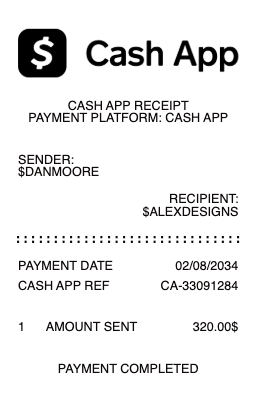
A typical Cash App-style receipt includes:

  • sender

  • recipient

  • payment amount

  • date

  • transaction status

  • unique transaction or reference ID

This format is simple, direct, and designed for quick verification. It allows users to clearly confirm who sent the payment, who received it, and when the transaction was completed.

Key Characteristics of Cash App Receipts

What makes this format distinct is the absence of itemization. There are no product lines, taxes, or retail elements. The entire structure is centered around the payment event itself.

Because of this, accuracy depends on correct sender and recipient details, as well as the transaction reference. These elements act as the primary proof of payment.

Common Uses of Cash App Receipts

Cash App receipts are often used for:

  • peer-to-peer payments between individuals

  • payments for freelance or small services

  • rent or shared expense transfers

  • simple reimbursement records

Structure and Format

The format is minimal and optimized for digital use. It is often shared as a screenshot, PDF, or email confirmation rather than printed.

Important Notice (Legal Use)

This example is provided for educational, formatting, and record-keeping purposes only. It is not intended for any illegal, deceptive, or misleading use.

When This Format Is Useful

A Cash App-style receipt format is useful when you need a clean, modern proof of payment focused on digital transactions rather than physical purchases.
Cash App Receipt

What's on a Cash App Receipt

A Cash App receipt is the record of a payment made through Cash App — a peer transfer, a Cash App Card purchase, or a direct deposit. It is built around Cash App's own identifiers rather than traditional bank fields. A complete Cash App payment record includes:

  • Payment / transaction ID — the unique reference for the payment

  • Date and time of the transaction

  • Sender and recipient $Cashtags (and names)

  • Amount and an optional note describing what it was for

  • Payment source — Cash App balance, a linked bank account, or a debit/credit card

  • Any fee — standard transfers are free; instant deposits and credit-card payments carry a percentage fee

  • Status (Completed, Pending) and the transaction type

Cashtags, Instant vs Standard, and Fees

Cash App identifies people by their $Cashtag — a unique username like $johnsmith — instead of an account number, so both Cashtags belong on the receipt. Money you receive lands in your Cash App balance and can be cashed out two ways: a standard deposit (free, 1–3 business days) or an instant deposit to a linked debit card for a small percentage fee (commonly around 0.5%–1.75%). Sending from a linked credit card also adds a 3% fee, while sending from balance or bank is free. Because these fees change the net amount, showing the fee line keeps a Cash App receipt accurate.

Peer Payments, Cash App Card, and Direct Deposit

Not every Cash App record looks the same. A peer payment shows the two $Cashtags, the amount, and the note. A Cash App Card purchase looks more like a debit transaction — merchant name, amount, and date, sometimes with a Boost discount applied. A direct deposit (paycheck or tax refund routed to Cash App) shows the payer and the deposit amount. When you recreate a Cash App receipt, match the fields to the transaction type so the record is consistent with how the money actually moved.

Why People Need a Cash App Receipt

Cash App is used for everyday money movement, so its receipts double as proof of payment in dozens of situations: paying a share of rent or utilities, reimbursing a friend, paying a freelancer or a small vendor, or receiving payment for a sale. The other party — a landlord, a client, or a roommate — often wants a clear record showing the $Cashtags, amount, date, and note. A clean, formatted receipt makes that proof easy to file for bookkeeping, an expense report, or a dispute, instead of screenshotting a small in-app payment card.

Related digital wallet receipts: see also our Cash App business receipt guide and our Venmo receipt guide.

Generate a Cash App Receipt — Free, No Login

Our Cash App receipt generator builds a clean payment record with every field in place: payment ID, date and time, sender and recipient $Cashtags, amount, note, payment source, fee, and status. Edit each field and download a formatted file in PDF, PNG, or JPG in under a minute — no account required. It's ideal for reconstructing a payment you couldn't export cleanly, giving someone clear proof of a transfer, or keeping a tidy record of Cash App activity.

Legal note: Any Receipt Generator is not affiliated with Cash App, Block, Inc., or any bank, and does not process payments or validate the authenticity of any generated document. This tool is strictly for legitimate record-keeping, reimbursement, and bookkeeping purposes. Creating a receipt for a payment that did not occur, altering an amount, or using a document to commit fraud is prohibited; users assume full responsibility for the accuracy and intended use of the files they generate.

Frequently asked questions

Everything you need to know about the product and billing.

What is a Cash App receipt?
A Cash App receipt is the record of a payment made through Cash App — a peer transfer, a Cash App Card purchase, or a direct deposit — showing the payment ID, date, sender and recipient $Cashtags, amount, note, and status.
What details are on a Cash App payment record?
The payment or transaction ID, date and time, the sender and recipient $Cashtags, the amount and note, the payment source (balance, bank, or card), any fee, and the status.
Does Cash App charge a fee?
Standard transfers and cashing out over 1–3 business days are free. Instant deposits to a debit card carry a small percentage fee (commonly around 0.5%–1.75%), and sending from a linked credit card adds about 3%.
What is a $Cashtag on the receipt?
A $Cashtag is a Cash App user's unique username (like $johnsmith). Cash App identifies people by their $Cashtag instead of an account number, so both appear on the payment record.
Why would I need a Cash App receipt?
As proof of payment — for splitting rent or utilities, reimbursing a friend, paying a freelancer or vendor, or documenting money you received — to file for bookkeeping, an expense report, or a dispute.
What formats can I download, and is it free?
You can export Cash App receipts as PDF, PNG, or JPG for free, with no login. Watermark-free downloads are available with a paid upgrade.