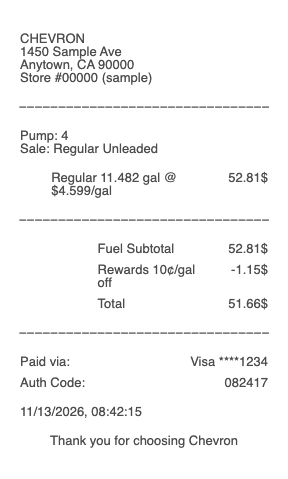
What a Chevron receipt shows
Station block — Chevron (or Texaco) name with the street address of that exact station
Date, time and pump number — the three details a cashier needs to find your sale again
Fuel grade, gallons and price per gallon
Rewards discount — cents off per gallon when you said YES on the pump screen to redeem points
Car wash, when you added one in the app before fueling
Total and payment — card type and last four digits, Techron Advantage card, gift card or app payment
The discount line is the part people check most. If it is missing, the price was still lowered at the pump, but the slip does not prove it. The next sections cover how to get a copy that does.
How to get a copy of a Chevron receipt
At the pump: answer yes when the pump asks about a receipt.
Inside the station: if the printer was empty or you said no, the cashier can usually reprint the sale. Give the pump number, the time and the card you used.
In the app: if you paid with Fuel Up in the Chevron or Texaco app, the receipt is already saved. Open Wallet, tap History and pick the fill-up. Chevron's support pages say the transaction detail can send the receipt to your email.
Card paid, no app, already home: call or visit the station. The sale sits in that station's register, so the station that sold the fuel is the one to ask.
Why your pump receipt may not show the fuel discount
Chevron and Texaco's station support article on paper receipts with an Instant Fuel Discount (about three years old when we read it in November 2026) says the receipt printed at the pump may not list the discount. Two ways to get proof of it:
Ask the cashier for an indoor reprint, which the article says does show the discount.
Open the purchase in the app. The transaction detail shows the discount per gallon and can be emailed.
This matters for expense claims. If your employer pays the amount on the receipt but you actually paid less, the receipt with the discount is the honest one to submit.
Chevron and Texaco: one app history for both
Chevron's app guide says both the Chevron and the Texaco app work at every participating Chevron and Texaco station. So a Texaco fill-up paid in the Chevron app appears in the same Wallet history, and the same points and discounts apply. On paper, the receipt carries the brand of the station you fueled at, not the app you used. For help with a missing app receipt, use Profile → Help → Contact us in the app, which reaches Chevron's customer center.
Make a Chevron-style receipt for a fill-up you made
Our Chevron receipt template lays out the station block, pump, gallons, price per gallon, rewards discount and total in the narrow format of a pump slip. Use it to rebuild the record of a real Chevron purchase when the slip faded, never printed, or left out your discount.
For your own real purchases only. Enter the gallons, price and total you actually paid. A receipt for fuel you did not buy, or one with a higher total than you paid, is fraud.
For the general fill-up guide and tax use see the gas receipt page; truck and fleet logs are on the fuel receipt page.