A dental receipt — often called a walkout statement — itemizes your dental treatment, the procedure codes, what insurance paid, and what you paid out of pocket. It's the document behind insurance claims, FSA/HSA reimbursement, and medical-expense tax deductions. This guide explains what a dental receipt should include, what the CDT procedure codes mean, and how to get an itemized copy from your dentist.
Dental Receipt
Add custom logo
Edit line items
Choose payment method
Add/remove elements
Customize business information
Choose font
What's on a dental receipt (walkout statement)
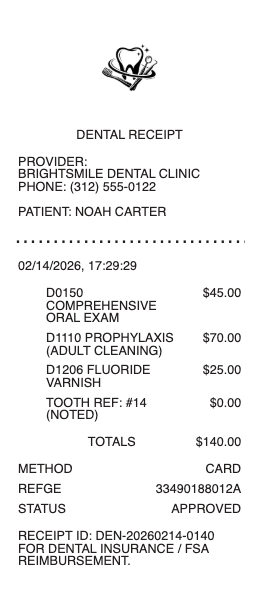
An itemized dental receipt goes beyond a payment total:
Practice, dentist & identifiers — the office details and the treating dentist, often with an NPI or license number insurers use.
Patient & date of service — who was treated and when.
Procedures with CDT codes — each treatment listed with its ADA "D-code" (like D1110 for an adult cleaning or D7140 for a simple extraction) and its fee.
Insurance vs. patient portion — what the plan paid or is expected to pay, and your out-of-pocket amount.
Total & payment method — what you actually paid at the visit.
Why the CDT procedure codes matter
Those D-codes beside each line are the CDT (Current Dental Terminology) codes the entire dental-billing world runs on. Insurers process claims by code, FSA and HSA administrators approve reimbursements by code, and a second opinion or new dentist can read your treatment history from them. A receipt showing only "dental work — $600" is routinely rejected for reimbursement; the itemized version with codes, fees, and the date of service sails through. If a claim stalls, matching the receipt's codes against the insurer's explanation of benefits usually locates the problem.
Dental receipts for insurance, FSA/HSA, and taxes
Three money paths run through this document. Insurance: if the office doesn't bill your plan directly, you submit the itemized receipt with a claim form for reimbursement. FSA/HSA: dental treatment is an eligible expense — cleanings, fillings, crowns, extractions, orthodontics — and the administrator wants the itemized receipt showing patient, provider, date, service, and amount. Taxes: out-of-pocket dental costs count toward the medical-expense deduction for amounts above 7.5% of AGI, with receipts as the substantiation. Keep every walkout statement — dental spending adds up faster than people expect.
For major work, the document to request before anything else is the pre-treatment estimate (predetermination): the office submits the planned procedures to the insurer, which responds with what it would cover — turning coverage from a guess into a written number. The walkout statement then reconciles against that estimate, and differences arrive as line items you can question rather than surprises you absorb.
How to get an itemized dental receipt
Ask the front desk for an itemized receipt or walkout statement before you leave — practices print them on request, and most patient portals let you download past statements and payment history. For an older visit, call the office and ask for an itemized statement with procedure codes for the date in question; billing staff produce these routinely for insurance and FSA purposes. If you're submitting to an FSA administrator, ask specifically for the version showing the CDT codes and the patient portion — that's the format that gets approved without follow-up questions.
Related medical receipts: see also our Therapy receipt guide and our Medical receipt guide.
Multi-visit treatments — crowns, implants, orthodontics — bill in stages, and the paperwork should follow: each visit's payment on its own receipt, tied to the treatment plan's schedule. Orthodontic contracts especially run on a down payment plus monthly instalments, where the contract, not any single receipt, states the full cost of the course.
Create a dental receipt
Our dental receipt template and generator lays out the walkout-statement format — practice and dentist, patient, date, procedures with codes and fees, insurance and patient portions, and total — in a clean printable form for practices and for patients organizing their reimbursement records.
For genuine treatment only — and this matters. Submitting a fake or altered dental receipt to an insurer, FSA, or HSA is fraud. Use this only to document real dental care that was actually provided and paid for.
General visit and bill paperwork is covered on the medical receipt page.
Frequently asked questions
Everything you need to know about the product and billing.
What is a dental walkout statement?
It's the itemized receipt a dental office prints after a visit — listing each procedure with its CDT code and fee, what insurance covers, your out-of-pocket portion, and the payment made. It's the document used for claims and reimbursements.
What are the D-codes on my dental receipt?
They're CDT (Current Dental Terminology) procedure codes — like D1110 for an adult cleaning or D7140 for a simple extraction. Insurers, FSA, and HSA administrators process claims by these codes, which is why the itemized receipt matters.
Can I use a dental receipt for FSA or HSA reimbursement?
Yes — dental treatment is an eligible expense. The administrator wants an itemized receipt showing the patient, provider, date, procedures (ideally with codes), and the amount you paid, not just a card charge. Staged treatments like implants and orthodontics reimburse visit by visit — keep each stage's receipt tied to the treatment plan, since no single receipt shows the full course.
Are dental expenses tax deductible?
Out-of-pocket dental costs count toward the medical-expense deduction for amounts above 7.5% of your adjusted gross income, with itemized receipts as substantiation. Cosmetic procedures generally don't qualify.
How do I get an itemized dental receipt?
Ask the front desk for an itemized receipt or walkout statement at checkout, download it from the patient portal, or call the office and request an itemized statement with procedure codes for a past date of service.
Why was my dental reimbursement claim rejected?
Usually because the receipt wasn't itemized — a total without procedure codes, dates, or the patient portion. Resubmit with the walkout statement showing CDT codes and what you actually paid, and match it against your insurer's explanation of benefits. For major work, a pre-treatment estimate prevents most of these surprises — the insurer states in writing what it will cover before the drill touches anything.