A grocery store receipt is denser than most receipts — abbreviated item names, department codes, tax flags, and loyalty savings all packed into one long slip. This guide explains how to actually read a grocery receipt, what the codes and abbreviations mean, how shoppers use receipts for budgeting and cash-back apps, and how receipt-back advertising works.
Grocery Store Receipt
Add custom logo
Edit line items
Choose payment method
Add/remove elements
Customize business information
Choose font
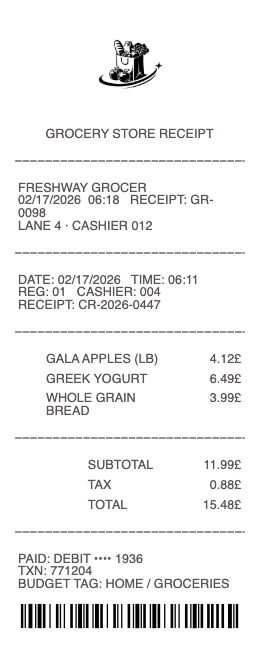
What's on a grocery store receipt
Grocery receipts follow a common structure whatever the chain:
Store & register details — the store number, address, lane, and cashier.
Abbreviated item names — shortened product descriptions (like "GV WHL MLK" for a gallon of whole milk) with each price.
Department & item codes — the internal numbers grouping items into produce, dairy, meat, and so on.
Tax flags — small letters (often F, T, or X) marking which items are taxable, since many states don't tax basic groceries.
Loyalty savings & coupons — member prices, digital coupons, and total savings lines.
Subtotal, tax & total — with the payment method and change.
How to read the codes and abbreviations
Two things confuse most shoppers. First, the abbreviations: register systems have limited line length, so products print as compressed codes — brand initials plus a shortened name. Second, the tax flags: a letter beside a price (commonly F for food/non-taxable, T or X for taxable) shows how each item was taxed, which varies by state — many states exempt staple groceries but tax prepared food, candy, or soda. If your tax line looks high, scan the flags: household goods, paper products, and hot food are usually the taxed items in the cart.
Grocery receipts for budgeting and cash-back apps
A grocery receipt is raw data for a food budget: totals by trip, savings from coupons, and price changes over time. That's why receipt-scanning apps are popular — cash-back and rewards apps let you snap a photo of any grocery receipt to earn rebates on qualifying items, and budgeting apps read the itemized lines to categorize spending. For households splitting costs, the itemized receipt settles who owes what. Snap a photo promptly: thermal paper fades, and most cash-back apps only accept receipts a few days old.
The unit price is the receipt's most under-read number where it appears: price per ounce, per litre, per hundred sheets. Trip-to-trip totals mislead — baskets differ — but unit prices are comparable across brands, package sizes, and stores, which makes a kept stack of receipts an actual price survey of where your staples run cheapest.
Receipt-back advertising and store programs
Ever noticed coupons printed on the back of a grocery receipt? That's receipt-back advertising — local businesses buy ad space on register tape, and stores offset printing costs while shoppers get neighborhood offers. Register systems also print catalina coupons (the separate slips triggered by what you bought) and survey invitations. For local businesses, receipt advertising is a niche but steady channel, since grocery receipts reach the same nearby households week after week.
Related grocery receipts: see also our grocery receipt guide and our Safeway receipt guide.
Price accuracy is its own small discipline: scanned prices occasionally disagree with the shelf tag, and several chains and some jurisdictions run scanner-accuracy policies that refund or discount mischarged items. The check takes ten seconds at the door — the receipt against the two or three prices you remember — and it is the only moment the error is cheap to fix.
Create a grocery store receipt
Our grocery receipt template and generator reproduces the standard register format — store details, abbreviated item lines with department codes, tax flags, savings, and totals — in a clean printable layout, useful for rebuilding a faded receipt for budgeting, reimbursement, or records.
For legitimate record-keeping only. A grocery receipt should reflect purchases you actually made; creating one for a shop that didn't happen, or altering items and totals for a refund, rebate app, or expense claim, is fraud. Use this only to reproduce or organize your own genuine grocery purchases.
Chain-specific formats live on the Kroger receipt, Whole Foods receipt, and Publix receipt pages.
Frequently asked questions
Everything you need to know about the product and billing.
What do the letters next to prices on a grocery receipt mean?
They're tax flags — commonly F for non-taxable food and T or X for taxable items. Many states exempt staple groceries but tax prepared food, candy, soda, and household goods, and the flags show how each item was treated.
Why are item names abbreviated on grocery receipts?
Register systems have limited line length, so products print as compressed codes — usually brand initials plus a shortened product name. The department code beside them groups items into produce, dairy, meat, and other categories.
Can I earn cash back by scanning grocery receipts?
Yes — cash-back and rewards apps accept photos of grocery receipts and pay rebates on qualifying items, and budgeting apps use the itemized lines to categorize spending. Scan promptly, since most apps only accept recent receipts and thermal paper fades.
What is receipt-back advertising?
It's ad space on the back of register tape that local businesses buy — the store offsets printing costs and shoppers get neighborhood coupons. It's separate from catalina coupons, the slips that print based on what you bought. Check prices before leaving too — scanned totals sometimes disagree with shelf tags, and scanner-accuracy policies only help while the error is fresh.
Why is the tax on my grocery receipt so low (or zero)?
Many states don't tax basic groceries. Tax usually applies only to items like prepared or hot food, candy, soda, and non-food household goods, which the receipt marks with a taxable flag.
How long should I keep grocery receipts?
For personal budgeting, until you've logged the trip or claimed app rebates. For returns, until the store's return window passes. For business or reimbursable purchases, keep the itemized receipt with your expense records — a photo works since thermal paper fades. They also work as a price survey — unit prices are comparable across stores and pack sizes in a way trip totals never are.