A Whole Foods receipt is the one grocery slip you often do not need to keep on paper: because Amazon owns Whole Foods Market, in-store purchases made with your Prime code land as digital receipts in your Amazon account. This page covers the printed receipt’s anatomy, the Amazon lookup that replaces it, and how returns work with and without one.
Whole Foods Receipt
Add custom logo
Edit line items
Choose payment method
Add/remove elements
Customize business information
Choose font
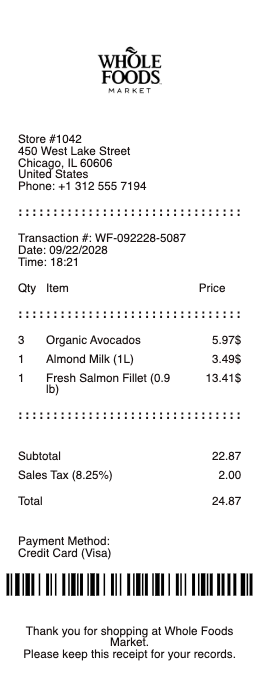
What’s on a Whole Foods Receipt
Store location and register information at the top
Each item with department pricing — produce by weight, prepared foods, grocery lines
Prime savings lines — yellow-tag discounts and Prime-member deals shown per item
Subtotal, tax, and total — with tax varying by state grocery rules
Payment method — card last four, Amazon One, or the app’s code
Prime code confirmation when you scanned in, which is what links the purchase to your Amazon account
Whole Foods Receipt Lookup: Finding Receipts in Your Amazon Account
If you scanned your in-store code (or used Amazon One) at checkout, the itemized receipt is already digital. In the Amazon app or site, open your orders and look for the Whole Foods Market section — each store visit appears as an order, with every item, discount, and the total, usually within minutes of checkout. That digital copy is the answer to a faded or binned paper slip: reprint it, screenshot it, or export it for an expense report. If you paid without scanning in, there is no account link — the paper receipt is the only record, exactly like any other grocery store.
The same account trail answers “which store was this?” months later, too — each digital receipt names the location, which matters for anyone splitting shopping across several Whole Foods stores in a metro.
Whole Foods Return Policy With and Without a Receipt
With a receipt — paper or the digital one in your Amazon account — Whole Foods refunds to the original payment method. Without one, returns are handled at the store’s discretion and, when accepted, are typically resolved as store credit at the current price; an ID may be requested. The practical move is to scan your Prime code every visit: it turns every purchase into a receipt you cannot lose, which is precisely what the no-receipt return conversation needs. Quality issues on perishables are the loosest case — stores generally make those right with far less friction.
Receipt Preferences: Paper, Email, or None
At the register you can set a receipt preference — printed, emailed, or no receipt — and scanning your code means the digital record exists regardless of what prints. For workflows that need paper (some reimbursement systems still do), ask for the printed copy and keep the digital one as backup. Households splitting groceries lean the other way: the account receipt itemizes everything, so one screenshot settles who owes what without keeping thermal paper alive in a drawer.
Related grocery receipts: see also our Trader Joe receipt guide and our Publix receipt guide.
Rebuild a Whole Foods-Style Receipt
Need a clean copy for records and the purchase never linked to an account? Our generator rebuilds a grocery-style receipt — store block, itemized lines with weights and per-item prices, discount lines, tax, and payment method — as a downloadable PDF.
Use it responsibly: recreate only purchases you actually made, with real amounts. Fabricating receipts for returns, reimbursements, or disputes is fraud. Whole Foods Market and Amazon are trademarks of their owners; this tool is not affiliated with either.
Shopping other chains? The Kroger receipt, Publix receipt, and grocery store receipt pages cover their formats.
Frequently asked questions
Everything you need to know about the product and billing.
How do I find my Whole Foods receipt on Amazon?
Open your Amazon orders in the app or on the site and look for the Whole Foods Market section. Every in-store purchase where you scanned your code (or used Amazon One) appears there as an itemized order shortly after checkout.
Why isn’t my Whole Foods purchase showing in my Amazon account?
The link is created by scanning your in-store code or using Amazon One at checkout. If you paid without scanning in, the purchase never attaches to your account and the paper receipt is the only record.
Can I return to Whole Foods without a receipt?
At the store’s discretion — no-receipt returns are typically resolved as store credit, and an ID may be requested. With a receipt or the digital copy in your Amazon account, refunds go to the original payment method.
Do Prime discounts show on the receipt?
Yes — Prime deals and yellow-tag savings print as discount lines against the specific items, and the same breakdown appears on the digital receipt in your account.
Can I get a Whole Foods receipt emailed instead of printed?
Yes — set your receipt preference at checkout to printed, emailed, or none. Scanning your code keeps the itemized digital record in your Amazon account regardless of the preference you choose.
Does the Whole Foods receipt work for expense reports?
Yes — the digital receipt in your Amazon account is itemized with store, date, items, tax, and total, and most expense tools accept a PDF or screenshot of it in place of the thermal slip.