An IT services receipt covers computer and network support — a one-off repair, a data recovery, or an ongoing managed-services contract — and it is more often a business invoice than a consumer slip. What it looks like depends on whether the work was break-fix or a monthly retainer, and whether it was done remotely or on-site. This page covers those models and how the receipt documents them.
IT Services Receipt
Add custom logo
Edit line items
Choose payment method
Add/remove elements
Customize business information
Choose font
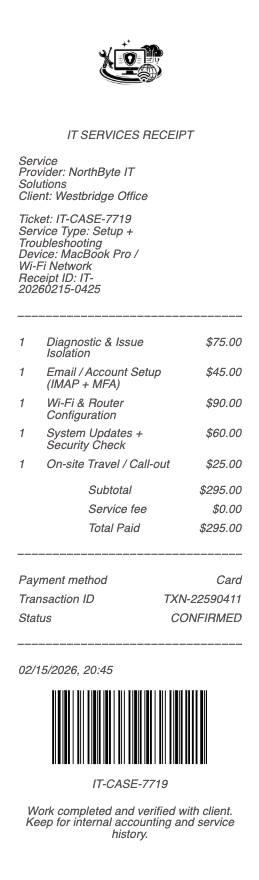
What’s on an IT Services Receipt
Provider name and, for business work, an invoice number and terms
Client and the device, system, or user count serviced
The work — repair, setup, data recovery, network config, security, support tickets
Billing model — hourly, per-ticket, per-device, or a flat monthly retainer
Remote vs. on-site, and any after-hours or emergency rate
Hardware/software or license lines, when supplied
Tax, total, and payment method or terms (net 30, etc.)
Break-Fix vs. Managed Services (MSP)
IT support splits into two models, and the receipt reads differently for each. Break-fix is pay-as-you-go: something breaks, you call, you are billed hourly or per-ticket for that job — the receipt is a one-off with labor, any parts, and the issue resolved. Managed services (an MSP arrangement) is a flat monthly retainer covering proactive monitoring, updates, security, and a set level of support — the receipt is a recurring invoice tied to a contract and often a service-level agreement, priced per device or per user rather than per incident. Knowing which model a receipt reflects explains the amount: a large recurring figure is a managed contract, a variable one-off is break-fix. Businesses increasingly run managed for predictable IT costs.
Remote vs. On-Site, and What Drives the Cost
Much IT work is now done remotely — a technician connects to the machine or network and resolves the issue without a visit — which is usually cheaper and faster and shows as remote-support time on the receipt. On-site work adds travel and a call-out element for anything physical: hardware, cabling, a server, a device that will not boot. Data recovery is its own line and often priced by difficulty or by the recovered volume, sometimes on a no-recovery-no-fee basis worth confirming on the receipt. After-hours and emergency response carries premium rates, especially under a contract’s SLA. The receipt’s split between remote, on-site, and premium time is what an approver checks against the agreement.
Business Expenses, Invoicing, and Records
IT services are overwhelmingly a business expense, so the document is usually a proper invoice with terms (net 30), a purchase-order reference, and sometimes tax-exempt handling — and it is deductible as an operating cost, with hardware and software possibly capitalized separately. For accounting, the itemized IT receipt or invoice is essential: it separates recurring managed fees, one-off labor, and equipment, which are treated differently on the books and which a bank line cannot distinguish. Providers keep the records and reissue invoices on request, common at quarter- and year-end reconciliation. For managed clients, keeping the contract, the monthly invoices, and any project receipts together is the complete record an audit or a renewal negotiation draws on.
Related home service receipts: see also our Moving Company receipt guide and our Electrician receipt guide.
Create an IT Services-Style Receipt
Our generator rebuilds an IT services receipt or invoice — provider and client, the work and billing model, remote/on-site split, any hardware or licenses, terms, and total — as a clean PDF for business accounting and records when the original is lost.
Use it responsibly: document real services at true amounts. Fabricating IT invoices for reimbursement, tax deduction, or to misstate business expenses is fraud. For genuine work, the provider retains the invoice and can reissue it — the authoritative document for any claim or audit.
Frequently asked questions
Everything you need to know about the product and billing.
What should an IT services receipt include?
The provider and (for business work) an invoice number and terms, the client and systems serviced, the work performed, the billing model (hourly, per-ticket, per-device, or monthly retainer), the remote/on-site split, any hardware or licenses, tax, and total.
What is the difference between break-fix and managed IT services?
Break-fix is pay-as-you-go — billed hourly or per-ticket when something breaks, shown as a one-off receipt. Managed services is a flat monthly retainer for proactive support under a contract, shown as a recurring invoice priced per device or user.
Why is remote IT support cheaper on the receipt than on-site?
Remote work resolves issues without a visit, so it bills as support time only. On-site adds travel and a call-out element for physical work like hardware or cabling, which appears as separate lines.
How is data recovery billed on an IT receipt?
Often as its own line priced by difficulty or recovered volume, sometimes on a no-recovery-no-fee basis. Confirm which applies on the receipt, since data recovery costs vary widely.
Are IT services a deductible business expense?
Generally yes — IT support is a deductible operating cost, though hardware and software may be capitalized separately. The itemized invoice separates recurring fees, labor, and equipment, which are treated differently on the books.
Can I get a copy of an IT services invoice?
Yes — providers keep the records and reissue invoices on request, common at quarter- and year-end. Managed clients should keep the contract, monthly invoices, and project receipts together for audits and renewals.