A monthly service receipt confirms a recurring charge for an ongoing service — pest control, lawn care, pool maintenance, an HVAC or home-warranty plan, alarm monitoring, cleaning. Unlike a digital subscription, these are real-world services delivered on a schedule under a service agreement, usually on autopay. This page explains what the monthly receipt shows, how the agreement and autopay shape it, and why keeping each one matters for cancellations and disputes.
Monthly Service Receipt
Add custom logo
Edit line items
Choose payment method
Add/remove elements
Customize business information
Choose font
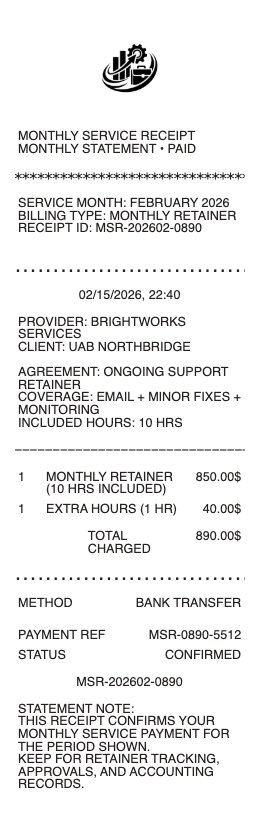
What’s on a Monthly Service Receipt
The provider and service, and the customer/account
The billing period the charge covers, and the service date if visit-based
The recurring amount — the monthly plan fee
Autopay indicator — the card or bank account charged
The plan or agreement reference, and its term
Any add-ons or one-off charges beyond the base plan
Next billing date, amount paid, and method
Recurring Service Plans and Autopay
Monthly-service billing runs on autopay against a service agreement: you authorize a card or bank account, and the provider charges the plan fee automatically each cycle, issuing a receipt as confirmation. This is how home and property services — pest control, lawn treatment, pool care, HVAC maintenance plans, security monitoring, recurring cleaning — are typically billed. The receipt matters precisely because the charge is automatic: it’s your record that the amount was correct and the service period was covered, which is how you catch a rate increase or a duplicate charge you didn’t initiate. Some plans bill a flat fee whether or not a visit happened that month (a maintenance or monitoring plan), while others tie the charge to a scheduled visit — the receipt’s period or service-date line tells you which. Keeping each month’s receipt builds the continuous record an autopay arrangement makes easy to lose track of.
Service Agreements, Terms, and Cancellation
The receipt sits on top of a service agreement, and its terms are what make these charges different from a casual subscription. Plans are either month-to-month (cancel anytime) or a fixed term commitment (often annual), and the difference decides your exit: a term agreement may carry a cancellation notice period or an early-termination fee, and providers often keep billing through a notice window. That’s why the monthly receipts matter at cancellation — they prove what you paid and through what date, your evidence if you’re billed after you canceled or charged a termination fee you dispute. Alarm-monitoring and some maintenance contracts are especially known for auto-renewing terms and notice requirements. Before assuming you can stop autopay by pulling the card, check the agreement — and keep the receipts that document your payment history against it.
Business Expenses, Records, and Getting Copies
For a business or rental property, recurring services are deductible operating expenses — pest control at a rental, monthly cleaning for an office, monitoring for a commercial site — and the monthly receipts are the substantiation, one per period, that an accountant totals at year-end. Because the charges recur, the practical trick is organization: providers keep your billing history in an online account or app, so you can usually download a full year of receipts at once rather than hunting month by month. For a mixed personal/business service, keep the receipts that show the account and period so the deductible share is clear. Whether the reason is a tax deduction, a cancellation dispute, or simply tracking what your recurring services cost, the receipt that names the plan, the period, and the amount is the record to hold — and it’s almost always retrievable from the provider’s portal if you lose one.
Related professional service receipts: see also our Professional Services receipt guide and our Contractor receipt guide.
Create a Monthly Service Receipt
Our generator produces a clean monthly service receipt — provider and customer, the plan and period, the recurring amount, autopay method, and total — as a PDF when you need a legible copy for a business expense file, a cancellation record, or your own budget.
Use it responsibly: recreate only real charges for services actually provided, with their true amounts and periods. Fabricating monthly-service receipts to claim a business deduction for a plan you don’t have, or to invent proof of an active service, is fraud — the provider’s billing records are the authoritative source and can be verified. This tool is for legitimate record-keeping only.
Frequently asked questions
Everything you need to know about the product and billing.
What does a monthly service receipt show?
The provider and service, the customer account, the billing period covered (and service date if visit-based), the recurring plan fee, an autopay indicator showing the card or bank account charged, the plan or agreement reference and term, any add-ons, and the next billing date.
How does autopay work for a monthly service?
You authorize a card or bank account, and the provider charges the plan fee automatically each cycle, issuing a receipt as confirmation. Because the charge is automatic, the receipt is your record that the amount was correct and the period covered — how you catch a rate increase or duplicate charge.
What’s the difference between a monthly service and a subscription?
A monthly service is a real-world service delivered on a schedule under a service agreement — pest control, lawn care, HVAC maintenance, alarm monitoring — while a subscription is typically digital. Service plans often carry term commitments and cancellation terms that a casual subscription doesn’t.
Can I cancel a monthly service anytime?
It depends on the agreement. Month-to-month plans cancel anytime; a fixed-term (often annual) agreement may require a cancellation notice period or an early-termination fee, and providers may keep billing through a notice window. Check the agreement before assuming you can stop it by pulling the card.
Why keep monthly service receipts?
They prove what you paid and through what date — your evidence if you’re billed after canceling or charged a termination fee you dispute. For a business or rental, they’re also the substantiation for deducting the recurring service as an operating expense, one receipt per period.
How do I get copies of monthly service receipts?
Providers keep your billing history in an online account or app, so you can usually download a full year of receipts at once rather than month by month. Keep the versions that show the account, plan, and period, which is what a deduction or a dispute needs.