A POS receipt is the record a point-of-sale system produces at checkout — the merchant’s proof of a sale and yours of a purchase. Modern POS platforms like Square, Clover, and Toast have changed what it looks like: card details, an authorization code, and increasingly a digital copy texted or emailed instead of printed. This page explains what’s on a POS receipt, the difference between the merchant and customer copies, and how digital receipts work.
POS Receipt
Add custom logo
Edit line items
Choose payment method
Add/remove elements
Customize business information
Choose font
What’s on a POS Receipt
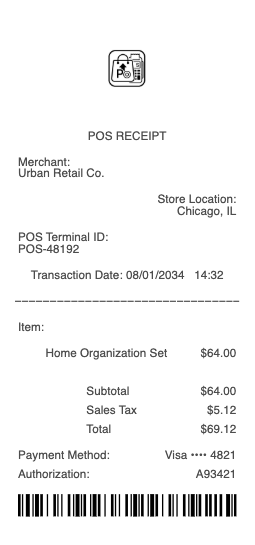
Merchant name, location, and often a store/terminal ID
Date, time, and a transaction or reference number
Itemized products or services, with subtotal, tax, and total
Payment method — card type, last four digits, and entry mode (chip, tap, swipe)
An authorization/approval code for card payments
A tip line, on receipts at restaurants and services
Merchant vs customer copy, and any return-policy footer
Modern POS Systems and What They Capture
“POS” refers to the hardware and software a business uses to ring up sales, and the cloud platforms that dominate today — Square, Clover, Toast, Lightspeed, Shopify POS — shape the receipt. They capture the itemized sale and, for card payments, route it through the processor and print the approval code and the card’s last four digits and entry method (chip/EMV, contactless tap, or swipe). Many run on tablets with card readers rather than a traditional register, and they tie each sale to a terminal or register ID so a business can reconcile takings across stations. Because these systems are itemized and connected, the receipt is also the merchant’s inventory and accounting record, not just a customer courtesy. Recognizing which details are the POS system’s (transaction ID, terminal, auth code) versus the card network’s helps you read any modern receipt and know what each line is for.
Merchant Copy vs Customer Copy
A card transaction at a POS often produces two receipts, and knowing the difference is useful. The merchant copy is the store’s record — historically the one you sign (or that captures the signature), which the business keeps for its books and for dispute evidence. The customer copy is yours, showing the same sale for your records. On tipped transactions, the merchant copy is where the tip and final total are written and retained, while your copy may show the pre-tip amount — a frequent source of confusion when a card statement later shows a higher figure than the customer receipt. For returns, the merchant copy’s transaction number links back to the original sale. Most POS systems can reprint either copy from the transaction record if one is lost, since the sale is stored in the system rather than existing only on paper.
Digital Receipts, Records, and Verification
The biggest shift in POS receipts is digital delivery: instead of (or alongside) printing, systems now email or text a receipt, prompted at checkout. That’s convenient for records — a digital receipt won’t fade like thermal paper and is searchable — but it means proof of a purchase may live in your inbox rather than a drawer. For expenses and returns, the itemized POS receipt (printed or digital) is the document you keep; the transaction/reference number is what a merchant uses to look up or reprint the sale. Because the POS system stores every transaction, a lost receipt is usually recoverable by asking the merchant to reprint it by date, card, or amount. For reconciliation, the receipt’s card last-four and auth code let you match it to your statement. Whether paper or digital, the POS receipt is the itemized anchor for any question about a sale.
Related payment receipts: see also our Square receipt guide and our Shopify receipt guide.
Create a POS Receipt
Our generator produces a clean point-of-sale receipt — merchant, itemized sale, tax and total, card details, and authorization code — as a PDF when you need a legible copy for your records, an expense file, or a return reference.
Use it responsibly: recreate only real transactions that actually occurred, with their true items and amounts. Fabricating a POS receipt to fake a purchase, support a false expense or return claim, or misrepresent a sale is fraud — the authoritative record is the merchant’s POS transaction data and the card processor’s record, which can be looked up and verified. This tool is for legitimate record-keeping only.
Frequently asked questions
Everything you need to know about the product and billing.
What does a POS receipt show?
The merchant name, location, and terminal ID; the date, time, and transaction number; itemized products with subtotal, tax, and total; the payment method with card type, last four, and entry mode; an authorization code for cards; a tip line where applicable; and whether it’s the merchant or customer copy.
What is a POS system?
The hardware and software a business uses to ring up sales. Cloud platforms like Square, Clover, Toast, Lightspeed, and Shopify POS dominate today — often tablets with card readers — and they capture the itemized sale, the card’s auth code and last four, and tie each sale to a terminal ID.
What’s the difference between the merchant and customer copy?
The merchant copy is the store’s record — historically the signed one — kept for its books and dispute evidence, and where a tip and final total are recorded. The customer copy is yours for the same sale, and may show the pre-tip amount, which can differ from your later statement.
Why does my card statement show more than my POS receipt?
Usually because of a tip. On tipped transactions the final total is written on the merchant copy, while your customer copy may show the pre-tip amount. The higher figure on your statement reflects the tip added at the merchant copy, not an error.
Can a merchant reprint a lost POS receipt?
Usually yes — POS systems store every transaction, so a merchant can look up and reprint a sale by date, card, or amount. The transaction or reference number makes it faster, since the sale lives in the system rather than only on the paper copy.
Are digital POS receipts valid for expenses and returns?
Yes — an emailed or texted POS receipt is itemized like a printed one and is valid for expenses and returns, with the advantage that it won’t fade like thermal paper and is searchable. Keep it with the transaction number, which the merchant uses to look up the sale.