A Shopify receipt is the order confirmation from an online store built on Shopify — the platform behind millions of independent shops. The nuance people miss: Shopify powers the checkout, but the merchant is the seller, so the receipt, tracking, and returns all come from that individual store, not from Shopify. This page explains what a Shopify order receipt shows, how Shop Pay and the Shop app fit, and where to get help.
Shopify Receipt
Add custom logo
Edit line items
Choose payment method
Add/remove elements
Customize business information
Choose font
What’s on a Shopify Order Receipt
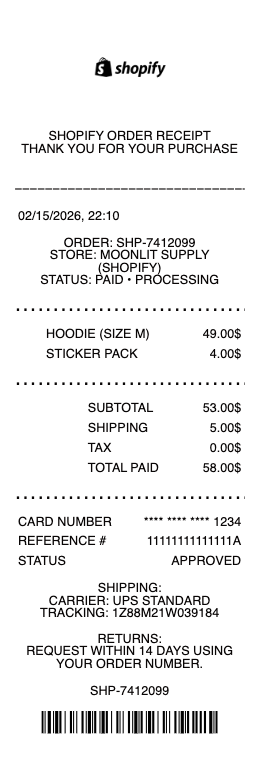
The store’s name and branding — it’s the merchant’s receipt, on Shopify
An order number and the order date
Itemized products, quantities, and prices
Shipping, discounts, and taxes, with the total
The shipping address and chosen delivery method
Payment method — including Shop Pay if used
Links to track the order or contact the store
Shopify Is the Platform — the Store Is the Seller
This is the key to reading a Shopify receipt: Shopify is the software that runs the store’s website and checkout, but the merchant is who you actually bought from. That’s why the order confirmation carries the store’s name and branding, not Shopify’s, and why your questions about shipping, sizing, or a refund go to that individual store — Shopify doesn’t handle customer service for the shops on its platform. Your card statement usually shows the merchant’s name (or sometimes a payment descriptor), which can be confusing if you’ve forgotten which small store you ordered from. The order confirmation email is the anchor: it names the store, the order number, and how to reach them. Understanding that you have a relationship with the merchant — with Shopify invisibly underneath — tells you exactly where to go for the receipt, tracking, or a return.
Shop Pay, the Shop App, and Installments
Shopify adds a few features that show up on receipts and orders. Shop Pay is Shopify’s accelerated checkout: it saves your details so you can check out in one tap across any Shopify store, and a receipt may note Shop Pay as the method. The Shop app ties it together — it tracks orders from every Shopify store you’ve bought from in one place, which is often the easiest way to find an order confirmation and delivery status without digging through email. Shop Pay Installments offers buy-now-pay-later on eligible orders, splitting the cost into payments, which appears on the receipt and generates its own payment schedule. These are conveniences layered on top of the individual store’s checkout, so they work the same across many merchants — a rare bit of consistency in a platform built on thousands of independent shops.
Returns, Refunds, Records, and Getting a Copy
Because the merchant is the seller, returns and refunds follow that store’s policy, not a single Shopify-wide rule — each shop sets its own window and terms, stated at checkout and often on the order confirmation. For a refund, the store processes it back to your original payment method, and the receipt/order number is your reference. To get a copy of a receipt, check the confirmation email, your account on that store if you made one, or the Shop app, which keeps your Shopify order history together. For expenses or records, the itemized order confirmation is the document to keep — it has the store, items, tax, and total. If you can’t find an order, the Shop app’s consolidated history is usually faster than searching email, since it gathers orders across every Shopify store you’ve used.
Related payment receipts: see also our Stripe receipt guide and our Square receipt guide.
Create a Shopify Receipt
Our generator reproduces a Shopify-style order receipt — store name, order number, itemized products, shipping and tax, and total — as a clean PDF when you need a legible copy for your records, an expense file, or a return reference.
Use it responsibly: recreate only real orders you actually placed, with their true items and amounts. Fabricating a Shopify order receipt to fake a purchase, support a false refund or expense claim, or misrepresent an order is fraud — the authoritative record is the merchant’s own order data, which the store and its payment processor can verify. Shopify and Shop Pay are trademarks of Shopify Inc.; this tool is not affiliated with them and is for legitimate record-keeping only.
Frequently asked questions
Everything you need to know about the product and billing.
What does a Shopify receipt show?
The store’s name and branding (it’s the merchant’s receipt on Shopify), an order number and date, itemized products with prices, shipping, discounts and taxes, the total, the shipping address and delivery method, the payment method including Shop Pay, and links to track or contact the store.
Is my receipt from Shopify or from the store?
From the store. Shopify is the platform running the checkout, but the merchant is the seller — so the confirmation carries the store’s branding and order number, and shipping, refunds, and support all come from that individual shop, not from Shopify.
Why does my card statement show a different name than the store?
The statement usually shows the merchant’s name or a payment descriptor, which can be confusing if you’ve forgotten which small Shopify store you ordered from. The order confirmation email is the anchor — it names the store, the order number, and how to reach them.
What is Shop Pay?
Shopify’s accelerated checkout that saves your details for one-tap purchases across any Shopify store, and it may appear as the payment method on your receipt. Shop Pay Installments also offers buy-now-pay-later on eligible orders with its own payment schedule.
How do returns work on a Shopify store?
Returns and refunds follow that individual store’s policy, not a Shopify-wide rule — each shop sets its own window and terms, shown at checkout and often on the order confirmation. Refunds go back to your original payment method, with the order number as reference.
How do I find a copy of my Shopify order?
Check the confirmation email, your account on that store, or the Shop app, which consolidates your order history across every Shopify store you’ve bought from. The Shop app is often the fastest way to find an order and its delivery status.