A Square receipt is the digital or printed receipt a business gives you when it takes payment through Square — emailed or texted automatically, or printed from a Square Terminal. This guide explains what's on a Square receipt, how customers can look one up, how sellers find and reprint receipts, and how Square's digital receipts work.
Square Receipt
Add custom logo
Edit line items
Choose payment method
Add/remove elements
Customize business information
Choose font
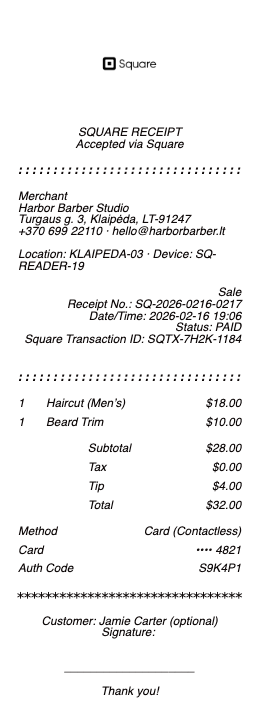
What's on a Square receipt
A Square receipt carries the seller's details and your transaction:
Business name & location — the seller who processed the payment through Square.
Itemized purchase — each item or service with its price, if the seller itemizes.
Subtotal, tax & tip — the amount before tax, sales tax, and any tip added on the Square screen.
Total & card — the amount charged and the card type with its last four digits.
Date, time & receipt number — when the sale happened and a reference for it.
Delivery method — whether it was emailed, texted, or printed.
How to look up a Square receipt
Square sends digital receipts automatically to the email or phone number you gave at checkout, so the fastest route is your inbox or texts. If you didn't get one, Square has a receipt lookup at squareup.com/receipt where you enter the card details and date to retrieve the receipt for a Square payment. Once you've received a digital receipt from a seller, Square can remember your contact info and send future receipts automatically. The receipt is issued by the seller's Square account, so for a corrected or itemized copy, the merchant is who to ask.
Finding and reprinting a Square receipt as a seller
If you run a business on Square, every sale is in your Square Dashboard under Transactions, where you can view a sale, resend the receipt by email or text, or issue a refund. From a Square Terminal or Register, you can reprint the last receipt or look up a recent transaction on the device. Square's digital receipts mean many sellers skip paper entirely, but if you print, the Terminal and compatible receipt printers use standard thermal receipt paper.
How Square digital receipts work
Square popularized the emailed and texted receipt: at checkout, the customer chooses how to receive it, and Square delivers it instantly with a link to the full details. This is convenient for expenses — the receipt is already a shareable digital copy — and it's why Square receipts rarely get lost. For a purchase, keep the emailed receipt or the link; for an expense report, the digital Square receipt shows the seller, items, tax, and total, which is exactly what a finance team needs, no photo of a faded slip required.
Square has one behavior that puzzles people: a receipt arriving by email from a shop where you never typed an address. The mechanism is card linking — enter your email once at any Square seller and Square remembers the pairing between that card and that inbox, then auto-emails receipts whenever the same card pays at other Square merchants. Handy for expense trails, surprising the first time it happens. You can manage or switch off these automatic receipts at Square’s receipt-settings page (squareup.com/receipts), per card — and the emailed copies remain valid, itemized proof of purchase like any printed slip.
Related payment receipts: see also our Stripe receipt guide and our POS receipt guide.
Square receipt templates and copies
If a Square receipt is missing and you need a clean copy for your records or an expense, our receipt template and generator can reproduce an itemized receipt — business, items, tax, tip, and total — in a readable format.
For legitimate record-keeping only. A receipt should reflect a purchase you actually made; creating one for a sale that didn't happen, or misstating an amount, is fraud. Use this only to reproduce or organize your own genuine Square transactions.
Frequently asked questions
Everything you need to know about the product and billing.
How do I look up a Square receipt?
Square emails or texts a digital receipt to the contact info you gave at checkout, so check there first. If you didn't get one, use Square's receipt lookup at squareup.com/receipt and enter the card details and date to retrieve it.
How do I get a Square receipt as a seller?
Open your Square Dashboard, go to Transactions, and select the sale — you can view it, resend the receipt by email or text, or refund it. From a Square Terminal or Register you can reprint the last receipt on the device.
Does Square send digital receipts?
Yes. At checkout the customer chooses email or text, and Square sends the receipt instantly with a link to the full details. Many Square sellers use digital receipts instead of printing.
What's on a Square receipt?
The business name and location, the itemized purchase (if the seller itemizes), subtotal, tax and any tip, the total, the card's last four digits, and the date, time, and a receipt number.
Can I get an itemized Square receipt for an expense report?
Yes — the digital Square receipt shows the seller, items, tax, and total, which is what expense systems require. Keep the emailed receipt or its link; the merchant can also resend an itemized copy from their dashboard.
Who issues a Square receipt?
The seller's Square account issues it, since Square processes the payment on the business's behalf. For a corrected or re-sent itemized receipt, contact the merchant who made the sale.