A Revolut receipt is a transaction confirmation from a digital-first neobank — an app-based account with no branches, where every payment, card tap, currency exchange, and transfer is recorded in-app rather than on paper. Because Revolut spans a spending card, multi-currency accounts, and international transfers in one app, its receipt looks different from a traditional bank slip. This page explains what it shows and how to export a clean copy.
Revolut Receipt
Add custom logo
Edit line items
Choose payment method
Add/remove elements
Customize business information
Choose font
What’s on a Revolut Receipt
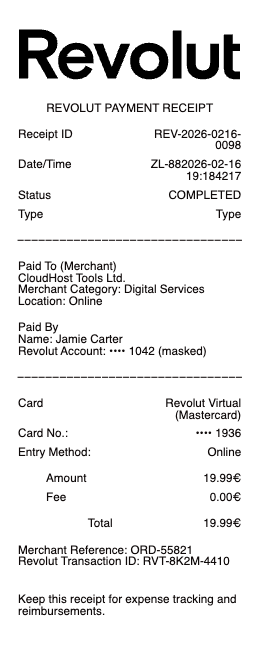
Merchant or recipient and the amount
The currency — Revolut holds and spends many, so this may not be your home currency
The exchange rate applied, if the payment converted currencies
Any Revolut fee — often zero, but weekend or over-limit FX adds a small markup
Date, time, and a transaction reference
The account or “pocket” and card used (physical, virtual, or disposable)
Category — Revolut auto-tags spending (groceries, transport, etc.)
Multi-Currency and the Exchange Rate Line
Revolut’s signature feature is holding and spending in many currencies, so the receipt often carries a currency and exchange-rate line a normal bank slip never shows. Spend abroad and Revolut converts at the interbank rate with no markup up to a monthly limit on standard plans; beyond that limit, or at weekends when currency markets are closed, a small fair-usage or weekend fee applies, and the receipt shows it. This is why two similar purchases can carry slightly different costs — one converted free, the other past the limit. For anyone tracking travel spend, the exchange-rate line is the useful part: it records exactly what rate you got and whether a fee applied, which a home-currency-only statement would hide.
Plans, Cards, and Fees That Show Up
Revolut runs tiered plans — Standard (free) up to paid tiers like Premium and Metal — and the plan changes which fees appear: higher FX limits, more free ATM withdrawals, and fewer surcharges on the paid tiers. The receipt also reflects which card made the payment: a physical card, an in-app virtual card, or a single-use disposable card that Revolut regenerates for online safety. ATM withdrawals past the monthly free allowance carry a percentage fee, and card payments that convert currency past the plan limit carry the FX markup — both itemized. Reading the fee line against your plan is how you tell an expected charge from one worth questioning, since Revolut’s costs are allowance-based rather than flat.
Exporting a Statement or Receipt from the App
Revolut is app-first with no branches, so every record lives in the app and there is no paper trail by default. Each transaction opens to a detail screen with the merchant, category, rate, and fee, and you can share or download that single receipt as a PDF for expenses or reimbursement. For a period, Revolut generates an official account statement (PDF or Excel) covering all transactions, and business users get downloadable records suited to bookkeeping. Because spending may span several currencies, the statement is often the clearer document — it consolidates conversions a single receipt shows only per-transaction. Everything is retrievable in-app, so a needed receipt is always a couple of taps away rather than lost.
Related money transfer receipts: see also our Wise receipt guide and our ACH payment receipt guide.
Create a Revolut-Style Receipt
Our generator rebuilds a neobank transaction receipt in the Revolut style — merchant, amount, currency and exchange rate, card type, and any fee — as a clean PDF when you need a legible copy for an expense report or your own records.
Use it responsibly: recreate only real transactions with their actual amounts, rates, and fees. Fabricating bank receipts to misstate spending, support a false expense claim, or mislead anyone is fraud — Revolut’s in-app history and official statements are the authoritative records. Revolut is a trademark of its owner; this tool is not affiliated with it.
Frequently asked questions
Everything you need to know about the product and billing.
What does a Revolut receipt show?
The merchant or recipient, the amount and currency, the exchange rate if it converted currencies, any fee, the date and reference, the card used (physical, virtual, or disposable), and Revolut’s auto-assigned spending category.
Why does my Revolut receipt show a different currency?
Revolut holds and spends many currencies, so a payment may draw from a non-home-currency balance or convert at checkout. The receipt shows the currency and the exchange rate applied, which a home-currency-only bank slip would not.
Does Revolut charge a fee on currency exchange?
Often none — it converts at the interbank rate up to a monthly limit on standard plans. Past that limit, or at weekends when markets are closed, a small fair-usage or weekend markup applies and appears on the receipt.
How do I download a receipt or statement from Revolut?
Open the transaction in the app to share or download it as a PDF, or generate an official account statement (PDF or Excel) for a chosen period from your profile. Everything is retrievable in-app since there are no branches.
What is a Revolut disposable card on a receipt?
A single-use virtual card Revolut regenerates after each online payment for security. The receipt notes which card type was used — physical, standard virtual, or disposable — so you can see how a given purchase was made.
Can I get a Revolut receipt for a business expense?
Yes. Each transaction exports as a PDF receipt with merchant, amount, rate, and category, and business accounts offer downloadable records suited to bookkeeping. For multi-currency spend, the full statement is often the clearer document.