A SWIFT transfer receipt — what banks call a SWIFT copy or MT103 — is the confirmation document behind an international wire. Beneficiaries ask for it to trace incoming money, suppliers demand it as proof a payment left, and it is the one document that follows a cross-border transfer through every bank it touches.
SWIFT Transfer Receipt
Add custom logo
Edit line items
Choose payment method
Add/remove elements
Customize business information
Choose font
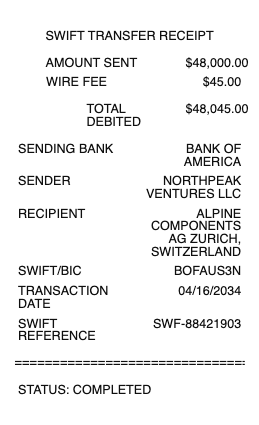
What’s on a SWIFT Copy (MT103)
Sender and beneficiary — names and account details on each end
Both banks’ SWIFT/BIC codes — the 8- or 11-character identifiers that route the payment
Amount and currency, plus the value date the funds settle
The UETR — the unique end-to-end reference that tracks the payment across the SWIFT network
Charge code — OUR, SHA, or BEN, deciding who pays the fees along the way
Sender’s reference and remittance information — the invoice or purpose line the beneficiary reconciles against
SWIFT Copy Meaning: What This Document Actually Is
A SWIFT copy is the confirmation of the interbank message — most often the MT103 — that the sending bank transmitted for a single customer payment. That is what makes it different from the ordinary wire receipt your bank prints at the counter: the domestic slip proves you handed the bank an instruction, while the MT103 documents the payment as it exists inside the SWIFT network, in the format every correspondent bank on the route can read. When an overseas supplier says “send the SWIFT copy,” they mean this document — with it, their bank can locate the incoming payment even before it lands.
Every swift receipt sample shows a date field people misread: the value date — the date the funds are good at the receiving end, which is not the date the message was sent. A transfer sent Friday afternoon with a Monday value date has not gone missing over the weekend; it is on schedule. Checking the value date before chasing anyone saves most of the panicked calls this document generates.
How to Get a SWIFT Copy From Your Bank
Only the sending bank can issue the MT103 for an outbound transfer, so the request starts there: business banking portals often offer it as a download next to the completed payment (sometimes labeled “payment confirmation” or “SWIFT/MT103 copy”), while retail customers usually request it from support or a branch after the wire has actually been transmitted — it does not exist until the message is sent. Some banks provide it free, others charge a small tracing fee. Beneficiaries can’t pull the sender’s MT103 themselves; they ask the sender for it, then hand it to their own bank to chase the credit.
Businesses that receive international payments regularly should standardise the ask: request the MT103 at the moment a customer says paid, not a week later when the money has not landed. The document surfaces problems while they are fresh — a typoed IBAN, an intermediary hold, a compliance query — and every one of those is easier to fix the day it happened than after the trail cools.
Reading It: BIC Codes, UETR Tracking, and Missing Money
Three fields answer most SWIFT questions. The BIC codes identify each bank — first four characters the institution, then country, location, and optionally a branch. The UETR is the payment’s tracking number: with SWIFT gpi, either bank can trace exactly where the transfer sits and which correspondent holds it. And the charge code explains the classic mystery of money arriving short: under SHA or BEN, intermediary banks deduct their fees from the amount in transit, so the beneficiary receives less than the sender dispatched. The SWIFT copy shows all three — which is precisely why everyone in a delayed-transfer dispute wants it first.
Related money transfer receipts: see also our wire transfer receipt guide and our Wise receipt guide.
Create a SWIFT-Style Transfer Record
Our generator rebuilds a SWIFT-style confirmation — sender and beneficiary blocks, BIC codes, amount with currency and value date, reference fields, and the charge code — as a clean PDF for your payment files when the original confirmation is buried in a banking portal.
Use it responsibly — and verify what you receive: fabricated SWIFT copies are a staple of payment scams. A PDF is not money; only your bank confirming the credit (or a gpi trace of the UETR) proves a transfer is real. Recreate only genuine transfers, with their real details, for your own records.
Related: the Bank of America wire transfer receipt for wires sent from that bank, and the Wise receipt for transfers made through Wise.
Frequently asked questions
Everything you need to know about the product and billing.
What is a SWIFT copy?
The confirmation of the interbank SWIFT message — usually the MT103 — behind an international transfer. It documents the payment in the format every bank on the route can read, and beneficiaries use it to trace incoming funds.
Is a SWIFT copy the same as a wire transfer receipt?
No. The counter receipt proves you instructed your bank; the SWIFT copy documents the actual interbank message, with the BIC codes, UETR, and charge code the receiving side needs to locate the payment.
How do I get a SWIFT copy of my payment?
From the sending bank, after the wire transmits — business portals often offer it as a download beside the payment, and support or a branch can issue it otherwise. Some banks charge a small fee.
What is an MT103?
The standard SWIFT message type for a single customer credit transfer. Its confirmation copy is the document people mean by “SWIFT copy” — the industry-standard proof a cross-border payment was sent.
Why did less money arrive than the SWIFT copy shows?
Check the charge code. Under SHA or BEN, intermediary banks deduct fees from the amount in transit, so the beneficiary receives less than was dispatched. OUR means the sender paid all charges. Check the value date first — funds are only due at the beneficiary end on that date, and a weekend or holiday between sending and value date is schedule, not delay.
Is a SWIFT copy proof that I was paid?
Treat it as proof of sending, not of settlement — fake copies circulate in payment scams. Confirmation comes from your own bank crediting the funds, or a SWIFT gpi trace of the UETR showing the payment delivered. Ask for it the day the payer says paid — a typoed IBAN or compliance hold is easiest to fix while fresh, and the MT103 is what surfaces it.