An adidas receipt is your order confirmation and proof of purchase for footwear or apparel bought from adidas — online, in the app, or in-store. What shapes it most is adiClub, adidas’s free membership program, which changes shipping, returns, and access. This page explains what an adidas receipt shows, how membership affects returns, and how to retrieve an order for a return or warranty.
Adidas Receipt
Add custom logo
Edit line items
Choose payment method
Add/remove elements
Customize business information
Choose font
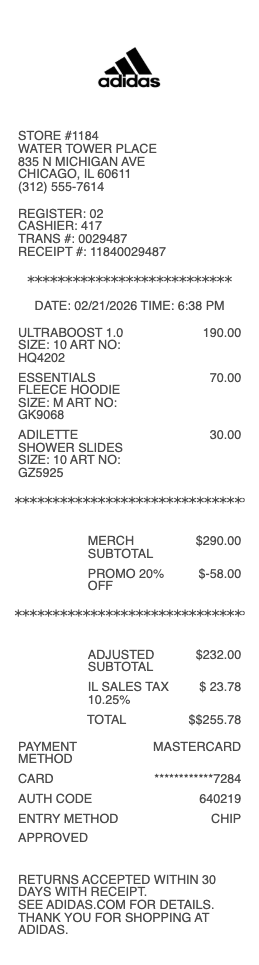
What’s on an adidas Receipt
An order number and order date
Itemized products — style name, product number, size, color, and price
Any discounts or promo codes, and adiClub member pricing
Shipping method and address, plus tax and total
The adiClub account tied to the order, if a member
Payment method
Return window and instructions for the order
adiClub Membership and What It Changes
adidas’s free loyalty program, adiClub, shapes a lot of what appears on an order and receipt. Members earn points on purchases that unlock rewards and tiers, and membership typically brings free shipping and free returns, member pricing and early access to sales, and access to member-only products and launches. So two identical orders can differ — a member’s may show free shipping or a discount a guest checkout wouldn’t — and the receipt reflects it. Membership also ties your orders to one account, which is what makes returns and history easy to manage in the adidas app or online. If you shop adidas even occasionally, the receipt often reflects a member benefit; understanding that adiClub status drives shipping and return terms explains differences you might otherwise find puzzling between orders or against a friend’s.
Returns, the Window, and Proof of Purchase
adidas offers a return window (commonly 30 days, and often extended for adiClub members and around holidays) for unworn items in original condition, and the receipt or order confirmation is your proof of purchase to start one. For an online order, you return by generating a prepaid label from your order history (free for members), or you can often return online purchases in-store. Refunds go back to your original payment. Personalized items (like miadidas/custom shoes) and certain final-sale products may be non-returnable, which the order notes. Because the return is tied to your order number and account, keeping the confirmation — or just being signed in — is usually enough. The receipt matters most when a return falls outside the simple app flow: a gift return, an in-store return of an online order, or a warranty question, where the itemized proof of what was bought and when is what the process needs.
Warranty, Records, and Getting a Copy
adidas provides a limited warranty against genuine manufacturing defects (as opposed to normal wear), and a claim is far smoother with proof of purchase showing the item and date — the receipt is that document. For records, the itemized confirmation is handy for expenses, gifts, or simply tracking a size that fit. To get a copy, your adidas account or the app stores order history — you can view, and often download or reprint, any online order — and a confirmation email is sent at purchase. For an in-store buy, the printed or emailed receipt is the record; adiClub members can have store purchases linked to their account too. Whether the reason is a return, a defect claim, or a gift receipt, the adidas order confirmation with its product numbers, size, and date is the reference to keep — and it’s almost always retrievable from your account if you signed in.
Related apparel receipts: see also our Nike receipt guide and our clothing store receipt guide.
Create an adidas Receipt
Our generator reproduces an adidas-style order receipt — order number, itemized products with size and product number, shipping, tax, and total — as a clean PDF when you need a legible copy for a return, a warranty claim, a gift receipt, or your own records.
Use it responsibly: recreate only real orders you actually placed, with their true items and amounts. Fabricating an adidas receipt to fake a purchase, support a false return or warranty claim, or misrepresent an order is fraud — adidas ties orders to your account and its own records, which it can look up and verify. adidas is a trademark of its owner; this tool is not affiliated with it and is for legitimate record-keeping only.
Frequently
asked questions
Everything you need to know about the product and billing.
What does an adidas receipt show?
An order number and date, itemized products with style name, product number, size, color, and price, any discounts or adiClub member pricing, the shipping method and address, tax and total, the adiClub account if a member, the payment method, and the return window and instructions.
What is adiClub and how does it affect my order?
adiClub is adidas’s free loyalty program. Members earn points and typically get free shipping and returns, member pricing, early access, and member-only products. So a member’s order may show free shipping or a discount a guest checkout wouldn’t — the receipt reflects it.
What is the adidas return window?
Commonly 30 days for unworn items in original condition, often extended for adiClub members and around holidays. The receipt or order confirmation is your proof of purchase to start a return, which you can do by prepaid label or often in-store for online orders.
How do I return an adidas online order?
Generate a prepaid return label from your order history (free for members) and send it back, or return the online purchase in-store. Refunds go to your original payment. The return is tied to your order number and account, so being signed in is usually enough.
Does adidas offer a warranty?
Yes — a limited warranty against genuine manufacturing defects, as opposed to normal wear. A claim is much smoother with proof of purchase showing the item and date, which is exactly what the receipt or order confirmation provides.
How do I get a copy of an adidas receipt?
Your adidas account or the app stores order history, where you can view and often download or reprint any online order, and a confirmation email is sent at purchase. For in-store buys, keep the printed or emailed receipt; members can link store purchases to their account.