A food delivery receipt documents an order placed through an app — DoorDash, Uber Eats, Grubhub, and the rest — and it is the one people scrutinize most, because the fee stack routinely pushes the total far above the menu price. This page explains what a delivery receipt shows across platforms, why the fees add up, and where the app-specific pages pick up.
Food Delivery Receipt
Add custom logo
Edit line items
Choose payment method
Add/remove elements
Customize business information
Choose font
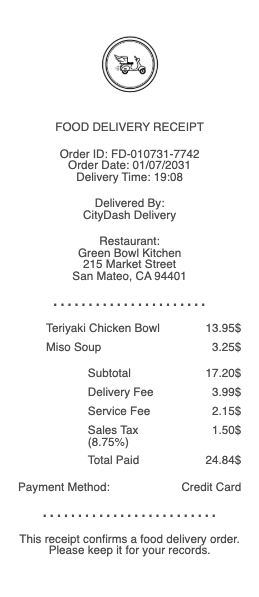
What’s on a Food Delivery Receipt
The platform and restaurant, plus an order or confirmation number
Each item with modifiers — sometimes at delivery-inflated menu prices higher than in-store
Delivery fee — the platform’s charge for the trip
Service fee — usually a percentage of the subtotal, separate from delivery
Small-order fee below the restaurant’s minimum
Tip for the driver, and any regulatory or long-distance surcharge
Tax, total, and payment method
Why the Delivery Total Is So Much Higher Than the Menu
Delivery receipts shock people because several charges stack on top of the food. The delivery fee is the platform’s trip charge; the service fee is a percentage on top of that; a small-order fee hits below the minimum; and menu prices themselves are frequently marked up for delivery versus what the restaurant charges in person. Add the tip, and a subscription (DashPass, Uber One, Grubhub+) that waives the delivery fee but not the others, and the itemized receipt is the only way to see where the money actually went. Reading each line — rather than reacting to the total — is what separates a fee you agreed to from one worth disputing.
The same fee logic now extends beyond restaurants: grocery and convenience delivery on these platforms adds shopping, service, and delivery fees plus a tip, so those receipts stack exactly the same way and deserve the same line-by-line read before you accept the total.
Getting Your Receipt and Expensing Delivery
Every platform emails an itemized receipt and keeps a copy in the app’s order history, downloadable or forwardable as a PDF — which is what an expense report needs, not the card-statement line that shows a single charge. For work meals, submit the itemized receipt with all fees visible, and note that some reimbursement policies cap or exclude delivery fees and tips, so a receipt that breaks them out cleanly avoids a bounced claim. Refunds for missing or wrong items are filed against the order in the app, and the receipt is the evidence of what was charged versus delivered. Keep it until any refund posts, since credits sometimes return as app credit rather than to the card.
Platform-Specific Delivery Receipts
Each app lays its receipt and fees out a little differently, and the lookup, refund, and reprint steps vary by platform. We keep dedicated pages for the services people search most: the DoorDash receipt, Uber Eats receipt, and Grubhub receipt. This page covers the fee structure and format they share; those cover each platform’s order history, refunds, and subscription details in depth.
Related food delivery receipts: see also our Grubhub receipt guide and our DoorDash receipt guide.
Create a Food Delivery-Style Receipt
Our generator rebuilds a delivery-order receipt — platform and restaurant, itemized food, delivery and service fees, tip, tax, and total — as a clean PDF when the original email is gone and an expense claim needs the itemized copy.
Use it responsibly: recreate only orders you actually placed, at their real amounts. Fabricating delivery receipts for reimbursement or refunds is expense fraud — every platform keeps the genuine receipt in your order history to reprint.
Frequently
asked questions
Everything you need to know about the product and billing.
Why is my food delivery total so much higher than the menu?
Fees stack: a delivery fee (the platform’s trip charge), a service fee (a percentage on top), a small-order fee below the minimum, and menu prices often marked up for delivery — plus the tip. The itemized receipt shows where each dollar went.
What is the difference between the delivery fee and the service fee?
The delivery fee is the platform’s charge for the trip itself; the service fee is a separate percentage of your subtotal. A subscription may waive the delivery fee but usually not the service fee.
How do I get an itemized food delivery receipt?
Every platform emails one and keeps a copy in the app’s order history, downloadable as a PDF. That itemized copy — not the card statement line — is what an expense report needs.
Can I expense food delivery fees and tips?
Sometimes — some policies cap or exclude delivery fees and tips. Submit the itemized receipt with every fee broken out so the approver can apply the policy without bouncing the claim.
How do I get a refund for a wrong delivery order?
File it against the order in the app; the itemized receipt proves what was charged versus delivered. Keep it until the refund posts, as credits sometimes return as app credit rather than to your card.
Which delivery apps have their own receipt pages here?
DoorDash, Uber Eats, and Grubhub each have a dedicated page covering their order history, refunds, and subscription details. This page covers the fee structure and format they share.