A Popeyes receipt is the record of your order — and often a ticket to the TellPopeyes survey for a free item or discount. This guide explains what's on a Popeyes receipt, where to find the survey code and store number, how the survey and validation code work, and how to get a copy of your order.
Popeyes Receipt
Add custom logo
Edit line items
Choose payment method
Add/remove elements
Customize business information
Choose font
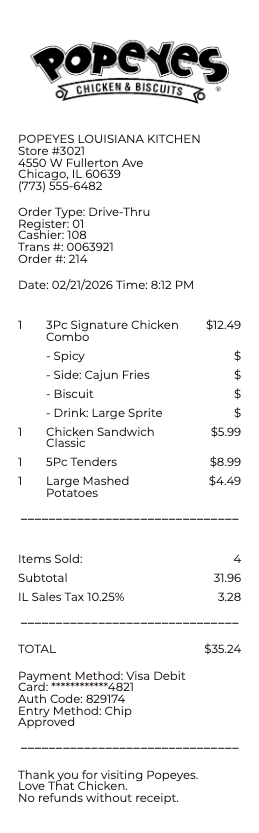
What's on a Popeyes receipt
A Popeyes receipt is a standard quick-service ticket with a few details that matter for the survey and records:
Restaurant (store) number & address — the location that served you, usually near the top.
Survey code — a code (often near the bottom) used to enter the TellPopeyes survey.
Order / transaction number — the number identifying your order.
Itemized food — each item and combo with its price.
Subtotal, tax & total — the food total, sales tax, and amount paid, with payment type.
Date & time — when the order was placed.
TellPopeyes: Trading Feedback for Chicken
That block of numbers near the bottom of a Popeyes ticket is an invitation. The TellPopeyes guest survey works like this: within a couple of days of your visit, go to tellpopeyes.com and punch in what the receipt gives you — a survey code on most tickets, or the store number, date, and time where no code prints. Rate the visit honestly (speed, order accuracy, whether the biscuits survived the drive home), and the site hands back a validation code. Write that code on the same receipt and bring it on your next visit — the offer it unlocks, typically a free side or a discounted item with a qualifying purchase, is stated on the ticket itself. One receipt, one survey entry, and the reward expires, so the loop is deliberately short: eat, rate, redeem.
Where to find the survey code and store number
If TellPopeyes asks for something you can't spot, here's where it lives. The survey code is generally printed near the bottom of the receipt, in the survey invitation area. The restaurant (store) number is usually at the top with the address, sometimes labeled "Store #." If your receipt has no survey code, that location may not be running the survey, or your slip is a kitchen or order copy rather than the customer payment receipt — the code appears on the customer receipt.
Getting a copy and Popeyes Rewards
Didn't get a receipt, or lost it? For an in-store order, ask the counter to reprint the last transaction. For a Popeyes app or delivery order (DoorDash, Uber Eats), the itemized receipt lives in that app's order history and your email confirmation, which is the easiest copy for an expense or refund. Separately, Popeyes Rewards members earn points on orders through the app — that's different from the receipt survey, which rewards feedback with a printed offer rather than points.
Two Popeyes-specific notes round out the picture. The chain’s full name — Popeyes Louisiana Kitchen — reflects its New Orleans roots (founded there in 1972), which is why receipts and menus lean on the Cajun framing. And Popeyes Rewards, run through the app, earns points on purchases that redeem for menu items; ordering in the app also stores your digital order history, the easiest lost-receipt insurance the brand offers — every app order is retrievable long after a paper ticket would have faded.
Related fast food receipts: see also our McDonald’s receipt guide and our KFC receipt guide.
Rebuild a Popeyes-Style Ticket
Grease-stained, faded, or left in the bag? Our generator recreates a Popeyes-style register ticket — store number and location line, order number, itemized combos and sides, tax, total, and payment method — as a clean PDF that stands in for the original in an expense file or your own records.
Responsible use only: recreate a purchase that genuinely happened, with its true items and amounts. Producing a fast-food receipt for a meal you never bought — to pad a per-diem, claim a reimbursement, or manufacture a refund — is fraud, and franchise registers log every real transaction by store, terminal, and time. Popeyes is a trademark of its owner; this tool is not affiliated with it.
Frequently
asked questions
Everything you need to know about the product and billing.
How does the Popeyes receipt survey work?
Many receipts invite you to TellPopeyes at tellpopeyes.com. Enter the restaurant number and survey code from the receipt, answer a few questions, and get a validation code to write on the receipt and redeem the printed offer — often a free item or discount with a qualifying purchase.
Where is the survey code on a Popeyes receipt?
It's generally printed near the bottom of the receipt, in the survey invitation area. You enter it, along with the restaurant number, at tellpopeyes.com.
Where is the store number on a Popeyes receipt?
Usually at the top of the receipt with the restaurant address, sometimes labeled "Store #." The survey asks for it to identify the location you visited.
How do I redeem a Popeyes survey offer?
After completing the TellPopeyes survey you get a validation code. Write it on your receipt and bring it on your next visit to redeem the printed offer, often a free item with a qualifying purchase, before it expires.
How do I get a copy of a Popeyes receipt?
For in-store orders, ask the counter to reprint the last transaction. For app or delivery orders, the itemized receipt is in the app's order history and your email confirmation.
Is the Popeyes survey the same as Popeyes Rewards?
No. The receipt survey (TellPopeyes) rewards your feedback with a printed offer, while Popeyes Rewards earns points on orders through the Popeyes app. They're separate programs.