A KFC receipt is the record of your order — and for many customers, the ticket to adding KFC Rewards points they missed at checkout. This guide covers what's on a KFC receipt, how to add points from a receipt to the KFC app, how the receipt survey works, and how to get a copy of an order.
KFC Receipt
Add custom logo
Edit line items
Choose payment method
Add/remove elements
Customize business information
Choose font
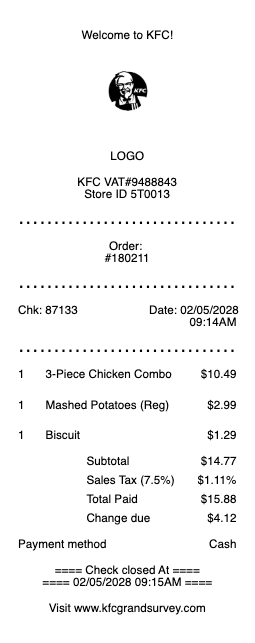
What's on a KFC receipt
A KFC receipt is a standard quick-service ticket with the details rewards and surveys rely on:
Restaurant (store) number & address — the location that served you, near the top.
Order / ticket number — the number identifying your order.
Itemized food — buckets, combos, sides, and drinks with their prices.
Date, time & register — when and where the order was placed.
Subtotal, tax & total — with the payment method.
Survey or promo code — an invitation code near the bottom on many receipts.
Bucket and family orders are where a KFC receipt earns its second read: shared meals ring up as a bundle line plus substitutions, and each swap — a side traded, a drink upsized — prints as its own adjustment. When a group order arrives short, that adjustment trail is exactly what the counter needs to see, because the bundle line alone says nothing about what was actually inside.
How to add KFC Rewards points from a receipt
The most common KFC receipt question: can I still get my points? Orders placed through the KFC app or website while signed in earn KFC Rewards points automatically. For an in-restaurant order, check the app for an add points / scan receipt option where offered — entering the receipt's details (store number, date, time, ticket number) or a printed code credits the visit. If the option isn't available or the window has passed, KFC customer support can often help using those same receipt details, so keep the slip until the points post.
The KFC receipt survey
Many KFC receipts also carry an invitation to KFC's guest experience survey. Enter the survey code (or the store number, date, and time) from your receipt on the survey site, answer a short set of questions about your visit, and you'll typically receive a validation code or offer to use on a future purchase. Like most receipt surveys, it has a completion window of a few days and the offer has its own expiration, so don't sit on it. The survey code and the rewards points are separate things — one rewards feedback, the other rewards purchases.
Getting a copy of a KFC receipt
For an in-store order, the counter can usually reprint the last transaction if you ask promptly. App orders keep their itemized receipts in your KFC account's order history, and delivery orders (DoorDash, Uber Eats, Grubhub) store the receipt in that platform's order history plus your email confirmation — the cleanest copy for an expense report or refund request. A card statement shows the charge but not the items, so for anything itemized, the app or email version is the one to keep.
Related fast food receipts: see also our Popeyes receipt guide and our Chick-fil-A receipt guide.
Delivery orders split the paper: KFC through its own app produces a KFC receipt with the rewards and survey hooks intact, while KFC through a third-party delivery platform produces the platform's receipt — different prices, no points, and refunds routed to the platform. Which app took the payment decides everything about what the receipt can do.
KFC receipt templates and records
If you need to rebuild a lost fast-food receipt for an expense report or your own records, our receipt template and generator can lay out a clean, itemized copy — store details, items, tax, and total — in a readable format.
For legitimate record-keeping only. Recreating a receipt for a meal you didn't buy, or to claim points, offers, or expenses you're not entitled to, is fraud. Use this only to reproduce or organize your own genuine purchases.
Related receipts: need another fast-food copy? Try the McDonald's receipt, Burger King receipt, or Popeyes receipt.
Pizza night instead? There’s a dedicated Pizza Hut receipt example too.
Frequently asked questions
Everything you need to know about the product and billing.
How do I add KFC points from a receipt?
App and website orders earn KFC Rewards automatically when you're signed in. For in-restaurant orders, use the app's add-points/scan-receipt option where offered, entering the store number, date, time, and ticket number from the receipt — or contact KFC support with those details.
Can I add a receipt to the KFC app after ordering in store?
Often yes — check the Rewards section of the app for an option to add a missed visit using your receipt details or code. There's a limited window, so add it soon after the purchase.
How does the KFC receipt survey work?
Enter the survey code (or store number, date, and time) from your receipt on KFC's guest survey site, answer a few questions, and you typically get a validation code or offer for a future visit. The survey and Rewards points are separate programs.
How do I get a copy of a KFC receipt?
In-store, ask the counter to reprint the last transaction. App orders keep receipts in your KFC account's order history, and delivery orders are stored in the delivery platform's history and your email confirmation. For group orders, check the adjustment lines while at the counter — substitutions print individually, and that trail is what resolves a short delivery.
Where is the store number on a KFC receipt?
Near the top of the receipt with the restaurant's address. You'll need it (plus the date, time, and ticket number) for surveys, points claims, or complaints.
Why didn't I earn points on my KFC order?
Points post automatically only for signed-in app or website orders. In-restaurant purchases need the receipt added in the app where that option exists — or a note to support with your receipt details — before the claim window closes. Third-party delivery orders are the usual reason — the platform's receipt, not KFC's, means the order never touched your rewards account.