A Pizza Hut receipt documents a dine-in, carryout, or delivery order at one of the chain’s locations. It lists the store number, ticket or order number, each item with its price, tax, any delivery fee, and the total paid. Use this example to see the standard layout, or rebuild a lost copy of your own purchase for your records.
Pizza Hut Receipt
Add custom logo
Edit line items
Choose payment method
Add/remove elements
Customize business information
Choose font
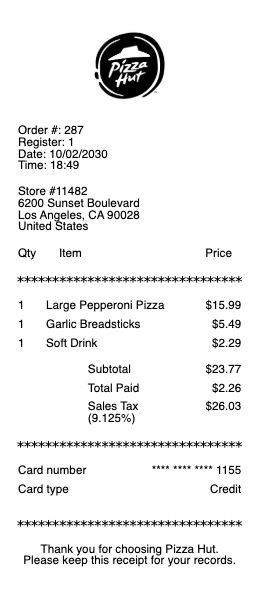
What’s on a Pizza Hut Receipt
Store number, address, and phone — printed at the top; you’ll need the store number for surveys and support requests
Date, time, and ticket or order number
Each item ordered — pizza size, crust, and toppings, plus wings, sides, desserts, and drinks, each priced separately
Deal and coupon lines shown as discounts against the regular menu price
Subtotal, sales tax, and total
Delivery fee and tip line on delivery orders
Payment method — cash tendered with change due, or the card brand with its last four digits
Pizza Hut Receipt Lookup: Finding an Online or In-Store Copy
For orders placed on the Pizza Hut website or app while signed in, the fastest lookup is your account’s order history, and the confirmation email doubles as an itemized receipt. If you checked out as a guest, search your inbox for that confirmation instead. For register purchases there is no national receipt lookup — the printed slip is the record — so ask the store for a reprint while the transaction is recent and give them the date, time, and ticket number. Orders placed through DoorDash, Uber Eats, or Grubhub are billed by the platform, so the receipt lives in that app, not with Pizza Hut.
Survey Codes and Hut Rewards Points from Your Receipt
Many register receipts print a guest-satisfaction survey invitation. To take the survey you’ll typically enter the store number, date, and time exactly as they appear on the slip, so keep the receipt until you’ve finished. Hut Rewards points post automatically when you order online signed in to your account; walk-in and phone orders don’t credit themselves, which is why adding Pizza Hut rewards from a receipt is such a common question. There’s no self-serve code entry for those — contact customer care with the receipt’s store number, date, total, and order number and ask for the points to be applied.
Itemized Delivery and Carryout Receipts
Delivery receipts carry two lines people mix up: the delivery fee and the tip. The delivery fee is a store charge, not the driver’s tip, so any tip you add is listed separately. For expense reports, save the itemized receipt rather than the card statement — reimbursement policies almost always want each food line visible, not one lump charge. And if the charge on your card doesn’t match the receipt, it’s usually the pre-authorization placed at order time; the final amount, including any tip adjustment, settles within a few business days.
Related fast food receipts: see also our Taco Bell receipt guide and our Subway receipt guide.
Rebuild a Pizza Hut-Style Receipt
Lost the slip you need for a reimbursement file or your bookkeeping? Our generator recreates a quick-service pizza receipt layout — store header, ticket number, itemized pizzas and sides, tax, delivery fee, and payment line — so your records stay complete. Enter your real order details and download a clean PDF copy.
Use it responsibly: a recreated receipt is a record of a purchase you actually made. Submitting an altered or fabricated receipt for refunds, expense claims, or disputes is fraud. This template is not affiliated with or endorsed by Pizza Hut.
Rebuilding paperwork for another chain? See the KFC receipt, Burger King receipt, and McDonald’s receipt examples.
Frequently asked questions
Everything you need to know about the product and billing.
How do I look up a Pizza Hut receipt from an online order?
Sign in to your Pizza Hut account and open your order history — each order shows an itemized breakdown. The order confirmation email is also an accepted itemized receipt for most expense purposes.
Where is the store number on a Pizza Hut receipt?
At the top of the printed slip, with the store’s address and phone number. Surveys and customer-care requests usually ask for it together with the date and time of your visit.
Can I get a copy of an in-store Pizza Hut receipt later?
Individual stores can usually reprint a recent register transaction if you provide the date, time, and approximate total. There is no national lookup for register purchases, so the older the transaction, the less likely a reprint becomes.
How do I add Hut Rewards points from a receipt?
Points post automatically only for online orders placed while signed in. For an in-store or phone order, contact Pizza Hut customer care with the store number, date, order total, and order number from your receipt and ask for the points to be credited.
Is the delivery fee on my Pizza Hut receipt a tip?
No. The delivery fee is a store charge and is listed separately from the tip line. If you want to tip the driver, add it at checkout or on the signed slip.
Why is my card charge different from my Pizza Hut receipt total?
The first charge you see is often a pre-authorization taken when you placed the order. The final settled amount — including any tip you added — replaces it within a few business days.