A Stripe receipt shows proof of payment processed through the Stripe payment gateway. It is commonly used for SaaS billing, online services, and business expense tracking.
Stripe Receipt
Add custom logo
Edit line items
Choose payment method
Add/remove elements
Customize business information
Choose font
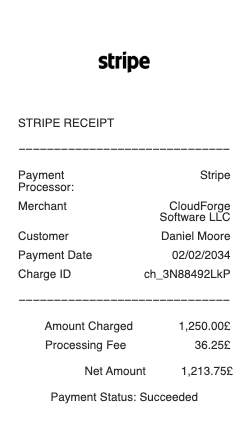
What's on a Stripe Receipt
Stripe is the payment technology behind millions of businesses, so a "Stripe receipt" isn't from Stripe itself but from the company you paid — sent through Stripe after a successful charge. It arrives by email (when the business enables receipts) and links to a hosted receipt page. A Stripe receipt typically shows:
Business name and logo — the merchant you paid, not "Stripe," since Stripe processes the payment on their behalf.
Receipt number — a unique reference for that payment.
Date and amount paid — when the charge succeeded and the total.
Payment method — the card brand and last four digits, or the wallet used.
Description — what the charge was for, as the business labelled it.
How Stripe receipts are sent — and how to get one
Stripe only emails a receipt when the business turns the feature on, which is why a Stripe payment receipt sometimes doesn't arrive automatically. Merchants enable emailed receipts in the Stripe Dashboard and can set them to send automatically after every successful payment, as well as customise the logo and colour. If you're a customer who didn't get one, check your spam folder, then ask the business to resend it from their Dashboard — they can look up the payment and email the receipt again. If you're the merchant, the payment's page in Stripe has a one-click option to resend the receipt to your customer.
Stripe receipt vs Stripe invoice
It's worth knowing the difference, because they're separate things. A Stripe receipt is proof that a payment already succeeded — it's issued after the money changes hands. A Stripe invoice is a request for payment, sent before or at the time a bill is due, often with a "Pay now" link. If you need a document to bill a customer, that's an invoice; if you need confirmation that a charge went through, that's a receipt. Many businesses that use Stripe Billing send an invoice first and a receipt once it's paid, so you may see both for a single purchase — each serving a different purpose in your records.
Using Stripe receipts for expenses and records
A Stripe receipt is a valid record for an expense report, a reimbursement or your bookkeeping, since it shows the merchant, amount, date and card used. The hosted receipt page Stripe links to can be saved as a PDF, which is the cleanest way to file it. For a Stripe receipt lookup, the fastest path is the original email or its hosted link; if that's gone, the business that charged you can find the payment in their Dashboard and resend it. When you only have a card-statement line and need a legible itemised copy for records, reconstructing the receipt from the real payment details keeps your books complete — a stand-in for a payment that genuinely happened, not a fabricated one.
Related payment receipts: see also our Square receipt guide and our Shopify receipt guide.
Create a Stripe-style receipt with our generator
Need a clean copy of a Stripe receipt for an expense report, a reimbursement or a template mock-up? Our receipt generator recreates the hosted-receipt layout — business name, receipt number, date, amount paid, card brand and last four, and a description line — and exports a print-ready PDF, PNG or JPG in under a minute, no account required. Enter your own payment details for a legible copy when the original email is buried. Please use it lawfully and honestly: create receipts only for payments that actually happened, for your own records and reimbursements — never to fake a payment, claim a refund you're not owed, or impersonate Stripe or a business. "Stripe" is a trademark of Stripe, Inc., referenced here only to describe the receipt format.
Frequently asked questions
Everything you need to know about the product and billing.
Why didn't I get a Stripe receipt?
Stripe only emails a receipt when the business enables the feature, so some payments don't trigger one automatically. Check your spam folder, then ask the business to resend it from their Stripe Dashboard.
Is a Stripe receipt from Stripe or from the business?
From the business. Stripe processes the payment and sends the receipt on the merchant's behalf, so it shows the company's name and logo — not "Stripe" — along with the amount and payment method.
What's the difference between a Stripe receipt and a Stripe invoice?
A receipt is proof of a payment that already succeeded; an invoice is a request for payment sent before it's paid. Businesses using Stripe Billing often send an invoice first and a receipt once it's paid.
How do I do a Stripe receipt lookup?
Start with the original receipt email or its hosted link, which you can save as a PDF. If it's gone, the business that charged you can find the payment in their Dashboard and resend the receipt.
Can a merchant send Stripe receipts automatically?
Yes. In the Stripe Dashboard a business can turn on automatic emailed receipts for every successful payment and customise the logo and colour, and can also resend a receipt for any individual payment.
Can I use this generator to recreate a Stripe receipt?
Yes, for legitimate purposes — replacing a lost receipt email for your own records, expense reports or design mock-ups. It is not for faking payments, claiming refunds you're not owed, or impersonating Stripe or a business.