A Stripe invoice is a billing document that requests payment; the receipt confirms it was paid. This guide explains Stripe invoice statuses, the 0.4% Invoicing fee, void vs delete, and how to keep clean records of an invoice you actually paid.
Stripe Invoice Receipt
Add custom logo
Edit line items
Choose payment method
Add/remove elements
Customize business information
Choose font
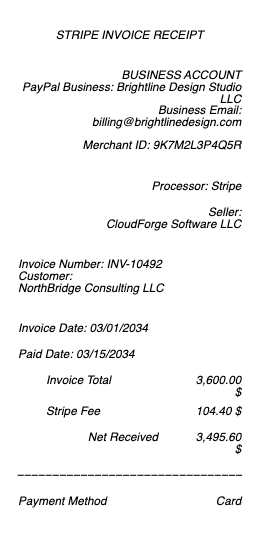
A Stripe invoice is not a Stripe receipt
These two documents get confused constantly, and the difference matters for your books. A Stripe invoice is a request for payment: it lists what is owed, by whom, and by when, and it can sit unpaid for weeks. A Stripe receipt is the confirmation that money actually moved. One is a bill; the other is proof of settlement.
The practical test: an invoice has a due date and can be voided. A receipt has a payment date and a charge ID. If you are reconciling books, the invoice tells you what was billed and the receipt tells you what was collected — and only the second one belongs in an expense claim.
The five Stripe invoice statuses
Every Stripe invoice lives in exactly one of five states, and reading the status correctly saves a lot of accounting confusion:
Draft — created but not sent. Fully editable, and it can still be deleted outright.
Open — finalized and sent to the customer. Awaiting payment. No longer deletable, only voidable.
Paid — settled. This is the state that generates a receipt and a payment record.
Void — cancelled after finalization. It stays in the record permanently, marked void, because finalized invoices cannot be erased from the audit trail.
Uncollectible — written off as bad debt. The invoice was real, the money never arrived, and the business is recording that fact rather than pretending the bill never existed.
The void vs delete distinction trips people up: you can delete a draft, but a finalized invoice can only be voided. That is deliberate — once a document has been issued to a customer, accounting integrity requires it leave a trace.
What Stripe Invoicing actually costs
Stripe charges for invoicing on top of standard payment processing, and the pricing is usage-based rather than a subscription:
Invoicing Starter: 0.4% per paid invoice, capped at $2.
Invoicing Plus: 0.5% per paid invoice, for businesses needing more advanced billing features.
Two details worth internalizing. First, the fee only applies when an invoice is actually paid — drafts, open invoices, and voids cost nothing. Second, the $2 cap on Starter changes the math dramatically at the high end: a $10,000 B2B invoice costs $2 in invoicing fees, not $40. Standard Stripe Payments processing fees apply separately and are the larger cost on most transactions.
Reading the fields on a paid Stripe invoice
A Stripe invoice document carries a specific set of identifiers, and knowing which is which makes reconciliation quick:
Invoice number — the human-readable sequential reference (e.g. INV-0042), what your customer quotes back to you.
Invoice ID — Stripe's internal identifier, beginning
in_. This is what you search in the dashboard.Line items — each billed product or service, with quantity, unit price, and any proration.
Amount due / amount paid — these differ when a partial payment or credit has been applied.
Memo and footer — free-text fields many businesses use for PO numbers or payment terms.
Hosted invoice URL and invoice PDF — the two ways a customer can view or download the document.
Keeping records when the original is gone
Stripe stores your invoices indefinitely in the dashboard, so the first move for a missing document is always to search there by invoice ID, customer email, or amount. Exports are available as CSV for bulk reconciliation, and each invoice keeps its own PDF.
Where a recreated record helps is on the paying side: if you were billed through Stripe and need clean documentation of a payment you genuinely made — for an expense report, a reimbursement, a VAT return, or your own bookkeeping — you can reconstruct a clear record of your own transaction from the details you already have in your bank or card statement. That is documentation of a real payment, not an invented one, and it should always match the underlying charge exactly.
Related: the Stripe receipt for card payments taken through Stripe, the invoice payment receipt for invoices paid by other means, and the receipt of payment page for what any payment receipt should show.
Frequently asked questions
Everything you need to know about the product and billing.
What is the difference between a Stripe invoice and a Stripe receipt?
An invoice requests payment and can sit unpaid or be voided; a receipt confirms payment actually happened and carries a payment date and charge ID. For expense claims and reimbursement, the receipt is the document that counts.
How much does Stripe charge per invoice?
Invoicing Starter is 0.4% per paid invoice, capped at $2. Invoicing Plus is 0.5% per paid invoice. The fee applies only when an invoice is paid — drafts, open, and voided invoices cost nothing. Standard Stripe payment processing fees apply separately.
Can I delete a Stripe invoice?
Only while it is a draft. Once an invoice is finalized (status: open), it can no longer be deleted — you can only void it. Voided invoices remain in the record marked void, which preserves the audit trail.
What does 'uncollectible' mean on a Stripe invoice?
It means the invoice was legitimately issued but the business has written the debt off as unlikely to be paid. It is an accounting status for bad debt, distinct from void, which cancels the obligation itself.
What are the Stripe invoice statuses?
Draft (editable, deletable), open (finalized and sent, awaiting payment), paid (settled), void (cancelled after finalization), and uncollectible (written off as bad debt).
Where do I find an old Stripe invoice?
In the Stripe Dashboard under Invoices — search by invoice ID (beginning in_), invoice number, customer email, or amount. Each invoice has a downloadable PDF and a hosted invoice URL, and bulk exports are available as CSV.