Chipotle Receipt

Add custom logo
Edit line items
Choose payment method
Add/remove elements
Customize business information
Choose font

Overview of a Chipotle Receipt

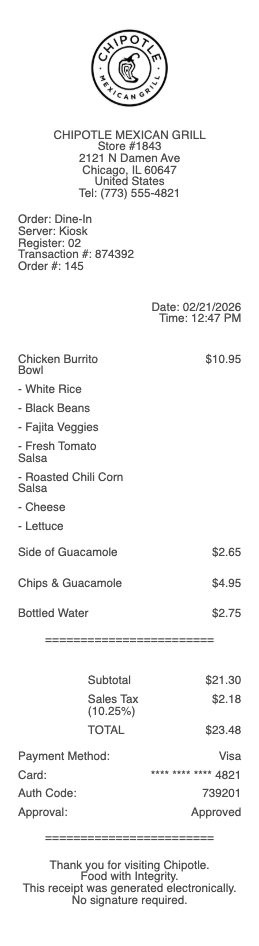
A Chipotle receipt records a quick-service meal at a Chipotle Mexican Grill location. It captures the customizable bowl, burrito, taco, or salad order along with toppings, sides, drinks, and chips. Chipotle uses a standard receipt format across its US locations, with the store address printed at the top and an itemized list reflecting each protein, base, and toppings choice. Receipts are commonly emailed to Chipotle Rewards members and printed on request.

What a Chipotle Receipt Includes

A typical Chipotle receipt shows:

  • store name "Chipotle Mexican Grill" and store address

  • store number and order ID (for in-app or web orders)

  • date and time of the order

  • line items for each entrée: bowl, burrito, tacos, salad, kids meal, quesadilla

  • add-on charges (guacamole, queso, extra protein)

  • sides — chips, chips & guac, chips & queso

  • drinks and bottled beverages

  • subtotal, sales tax, tip on catering or large orders, total

  • payment method and last 4 of card

  • Chipotle Rewards points earned and balance

Chipotle Rewards on the Receipt

If you order with a Chipotle Rewards account, the receipt lists the points earned for the order and any redemptions used. The rewards section appears below the totals, separately from payment. Email receipts from Chipotle.com or the Chipotle app include a Rewards summary at the bottom along with the order's QR code for in-store pickup.

Common Uses of Chipotle Receipts

People typically need Chipotle receipts for:

  • expense reports — business lunches, client meals, team meals

  • catering documentation for office events

  • budget tracking for personal expenses

  • customer service issues — missing items, incorrect order, food quality complaints

  • refunds or chargebacks if the order was wrong

Use this generator when you need a realistic Chipotle receipt for expense tracking, replacing a lost receipt, documentation, preview, or mockup purposes.

Legal Notice & Acceptable Use

A note on legitimate use. This template is for independent and small store operators issuing receipts to their own customers, and for shoppers reconstructing a record of an in-store purchase they actually made and paid for. Producing a receipt for goods that were not purchased, inflating the amount, or fabricating documentation to support a return, refund, store credit, warranty claim, expense report, business deduction, or insurance claim against a major retailer is fraud and is not what this tool is for. The only valid receipt for any return at a Walmart, Target, Costco, Home Depot, Best Buy, Macy’s, or other chain retailer is the original receipt issued by that retailer’s own POS system.

Chipotle is a trademark of Chipotle Mexican Grill, Inc.. Any Receipt Generator is not affiliated with, endorsed by, sponsored by, or associated with Chipotle. This template is provided for legitimate uses such as reconstructing lost receipts, expense reporting, and creative projects.
Chipotle Receipt

Chipotle Receipt Generator and Editor

Any Receipt Generator includes a free Chipotle-style receipt template you can fill in directly in your browser. The format mirrors what Chipotle prints at checkout — the store address header, the customizable bowl or burrito line items with toppings, the order total, and the check number used for Chipotle Rewards. Edit every field and download as PDF, PNG, or JPG.

Where Is the Check Number on a Chipotle Receipt

The check number on a Chipotle receipt is a 5–6 digit code printed near the bottom of the receipt, labeled "Check #" or just shown after the order ID. This is the number you enter in the Chipotle Rewards app to add points from a purchase. The same number is used by Chipotle support for in-store complaints and refund requests.

How to Add Chipotle Points From a Receipt

To add Chipotle Rewards points from a receipt, open the Chipotle app, tap Add Receipt, and either scan the barcode at the bottom or type in the check number, the date of purchase, and the total. Points are added within a few minutes and are based on the order subtotal. Receipts older than 7 days cannot be redeemed for points.

Chipotle Receipt Lookup and DoorDash Orders

For in-store and Chipotle app purchases, the receipt is stored in the Chipotle app under Order History. For DoorDash, Uber Eats, and Grubhub orders, the receipt is in the delivery app, not in Chipotle's — but the check number printed on the bag and in the delivery confirmation can still be used to claim Chipotle Rewards points.

Responsible Use

This Chipotle-style template is provided for legitimate documentation, expense recovery, design, and educational use only. Chipotle is a trademark of Chipotle Mexican Grill, Inc.; Any Receipt Generator is not affiliated with Chipotle. Users are fully responsible for the accuracy and intended use of generated files.

Frequently
asked questions

Everything you need to know about the product and billing.

Where is the check number on a Chipotle receipt?
The check number is a 5–6 digit code near the bottom of every Chipotle receipt, labeled "Check #" or shown after the order ID. It is the number you enter in the Chipotle app to claim Rewards points from a past purchase.
How do I add Chipotle points from a receipt?
Open the Chipotle app, tap Add Receipt, and either scan the barcode at the bottom of the receipt or type in the check number, date, and total. Points post within a few minutes. Receipts older than 7 days cannot be claimed for points.
How can I look up an old Chipotle receipt?
Chipotle app users can view past in-store and app orders in Order History. For DoorDash, Uber Eats, or Grubhub orders, the receipt is stored in the delivery app, not in Chipotle's. Email receipts are also issued for online orders.
Can I get Chipotle Rewards points from a DoorDash receipt?
Yes. Even when ordering through DoorDash, Uber Eats, or Grubhub, the check number printed on the receipt or shown in the delivery confirmation can be entered in the Chipotle app to claim Rewards points.
How do I scan a Chipotle receipt for points?
Open the Chipotle app, tap Add Receipt, and aim your phone camera at the barcode at the bottom of the printed receipt. The app will read the check number, date, and amount automatically and credit the points.
Why is my Chipotle receipt missing the check number?
If the check number is faded or missing, the receipt likely came from a third-party delivery (DoorDash, Uber Eats) — the number is on a separate sticker on the bag. For in-store receipts that print without a check number, contact the store directly with the date and amount.