A fast food receipt is the quick-service slip from a drive-thru, counter, or kiosk order — short, thermal-printed, and easy to lose, yet the thing you need for a survey reward, an expense report, or an order-accuracy dispute. This page covers what a QSR receipt shows across the chains, the survey and rewards codes hidden on it, and where the brand-specific pages pick up.
Fast Food Receipt
Add custom logo
Edit line items
Choose payment method
Add/remove elements
Customize business information
Choose font
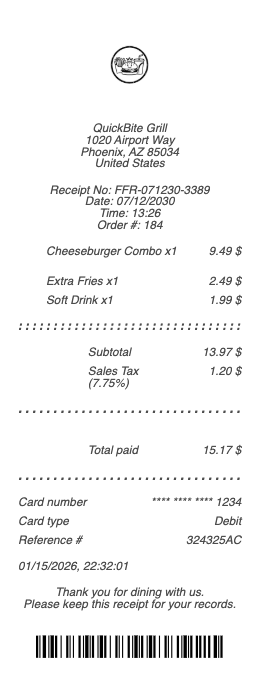
What’s on a Fast Food Receipt
Store number and location — the identifier surveys and support ask for
Date, time, and order number
Each item — combos, sizes, and add-ons, with value-menu or promo pricing
Subtotal, tax, and total
Payment method — card last four or cash with change due
Survey invitation or rewards code, on chains that print one
Order channel — drive-thru, counter, kiosk, or mobile pickup
The kiosk order changed where the paper comes from: self-order screens print a numbered slip before the food exists, and that slip — not the counter receipt of old — is what ties you to the order the kitchen sees. App orders go one further, holding the receipt in the order history with the store, time, and items already structured for an expense claim.
Survey Codes and Rewards Hidden on the Receipt
Most major chains print a guest-satisfaction survey invitation on the receipt — enter the store number, date, and time exactly as printed, and you typically get a validation code for a free item or discount on your next visit. Keep the receipt until the survey is done, because the code lives only on that slip. Rewards work separately: app and kiosk orders usually credit points automatically to your account, while walk-in and drive-thru orders often do not, which is why “how do I add points from my receipt” is one of the most common QSR questions. The answer varies by brand — the receipt’s store number, date, and total are what customer care needs to apply missed points.
Order Accuracy, Refunds, and Expensing Fast Food
Drive-thru accuracy disputes run on the receipt: it lists exactly what was rung up, which is what a manager checks against what ended up in the bag before issuing a remake or refund. For work, fast food is a routine per-diem and travel expense — the itemized slip is what a reimbursement policy wants, not the card line that shows only a total, and team or client meals need every item visible for the attendee context expense tools ask for. Because thermal receipts fade within months, photographing the slip at the window is the habit that saves the survey code, the reward, and the expense claim all at once.
Mobile-order and delivery receipts add a wrinkle worth noting: the itemized breakdown a kiosk or app produces is more complete than a hurried drive-thru slip, so when a claim or dispute is likely, the app receipt is the stronger document to keep.
Delivery reroutes the paperwork entirely: a chain's food ordered through a delivery platform produces the platform's receipt at the platform's prices — the chain's own app and the aggregator will price the same combo differently, and refunds for missing items route to whoever took the payment. The receipt's issuer, not the brand on the bag, is who owes you the fix.
Brand-Specific Fast Food Receipts
Every chain lays its receipt out a little differently, and the details that matter — survey program, rewards mechanics, store-number placement — are brand-specific. We keep dedicated pages for the receipts people search most: the McDonald’s receipt, Burger King receipt, KFC receipt, Popeyes receipt, and Pizza Hut receipt. This page covers the format they share; those cover each chain’s survey codes, rewards, and lookup quirks in detail.
Related dining receipts: see also our Ice Cream Shop receipt guide and our Restaurant receipt guide.
Create a Fast Food Receipt
Our generator rebuilds a quick-service receipt — store header, itemized combos and sides, tax, total, and payment line — as a clean PDF when a faded slip needs replacing for your expense file.
Use it responsibly: recreate only purchases you actually made, at their real amounts. Fabricating receipts for reimbursement, refunds, or survey rewards is fraud. For a genuine lost slip, the store that rang the order can often reprint a recent transaction.
Frequently asked questions
Everything you need to know about the product and billing.
What is on a fast food receipt?
The store number and location, date, time, and order number, each item with combo and size pricing, subtotal, tax, total, the payment method, and often a survey or rewards code. Kiosk and app orders add an order number that ties the slip to the kitchen's screen — the number, not the register, is the modern reference.
How do I use the survey code on my fast food receipt?
Enter the store number, date, and time exactly as printed at the chain’s survey site; you typically receive a validation code for a free item or discount. Keep the receipt until you finish — the code is only on that slip.
How do I add rewards points from a fast food receipt?
App and kiosk orders usually credit points automatically; walk-in and drive-thru orders often do not. Contact the chain’s customer care with the store number, date, and total from the receipt to have missed points applied.
Can I get a refund for a wrong fast food order?
Yes — the receipt lists what was rung up, which a manager checks against what was in the bag before issuing a remake or refund. Keep the slip until it is resolved. If the order came through a delivery platform, the refund routes to the platform — whoever issued the receipt owns the fix, not the brand on the bag.
Is fast food a valid business expense?
Yes, as a travel or per-diem meal expense. Reimbursement policies want the itemized receipt, not the card statement line, and team meals need every item visible for attendee documentation.
Which chains have their own receipt pages here?
We keep dedicated pages for McDonald’s, Burger King, KFC, Popeyes, and Pizza Hut, each covering that chain’s survey codes, rewards, and receipt-lookup specifics. This page covers the format they share.